Homepage
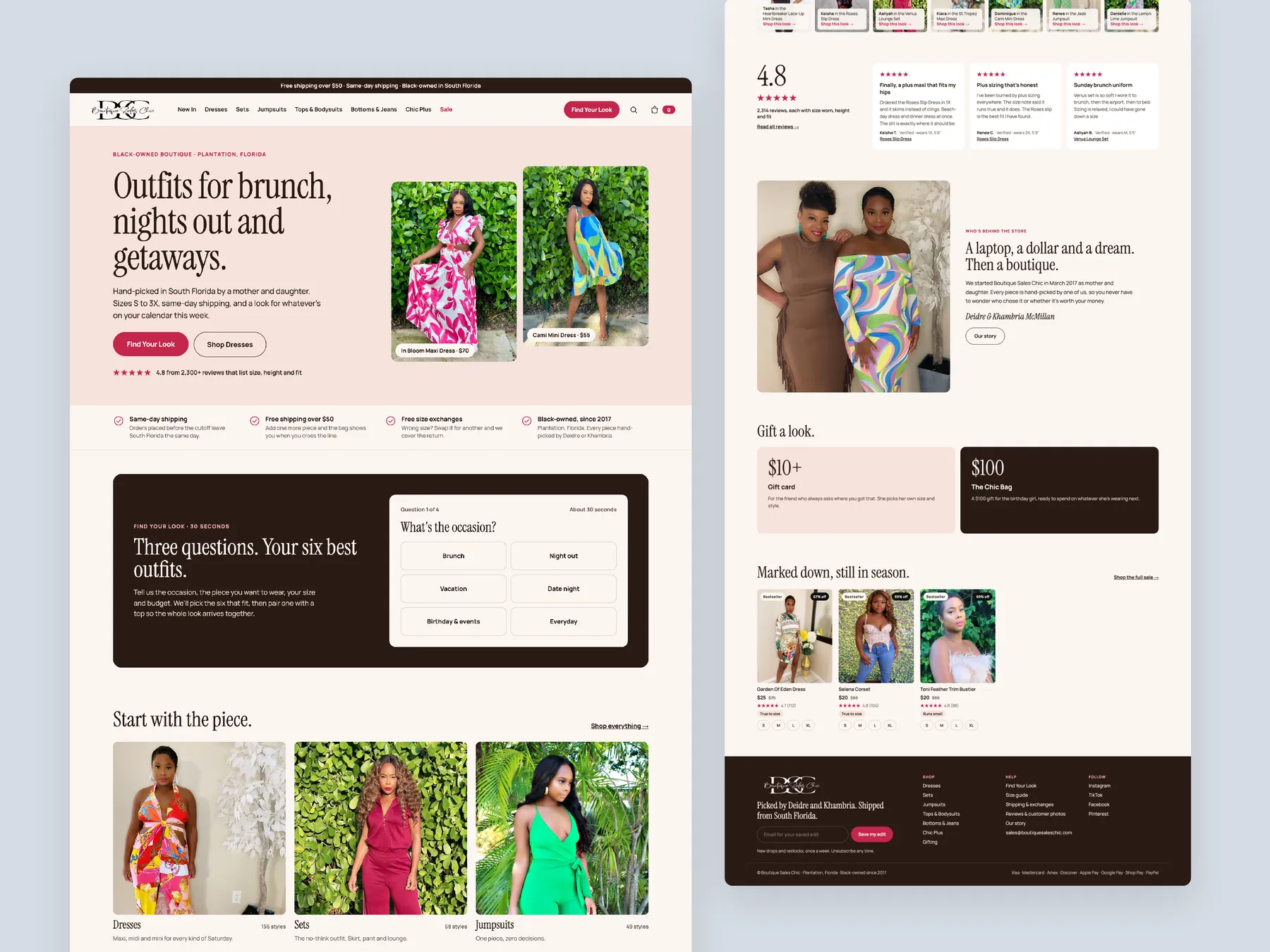
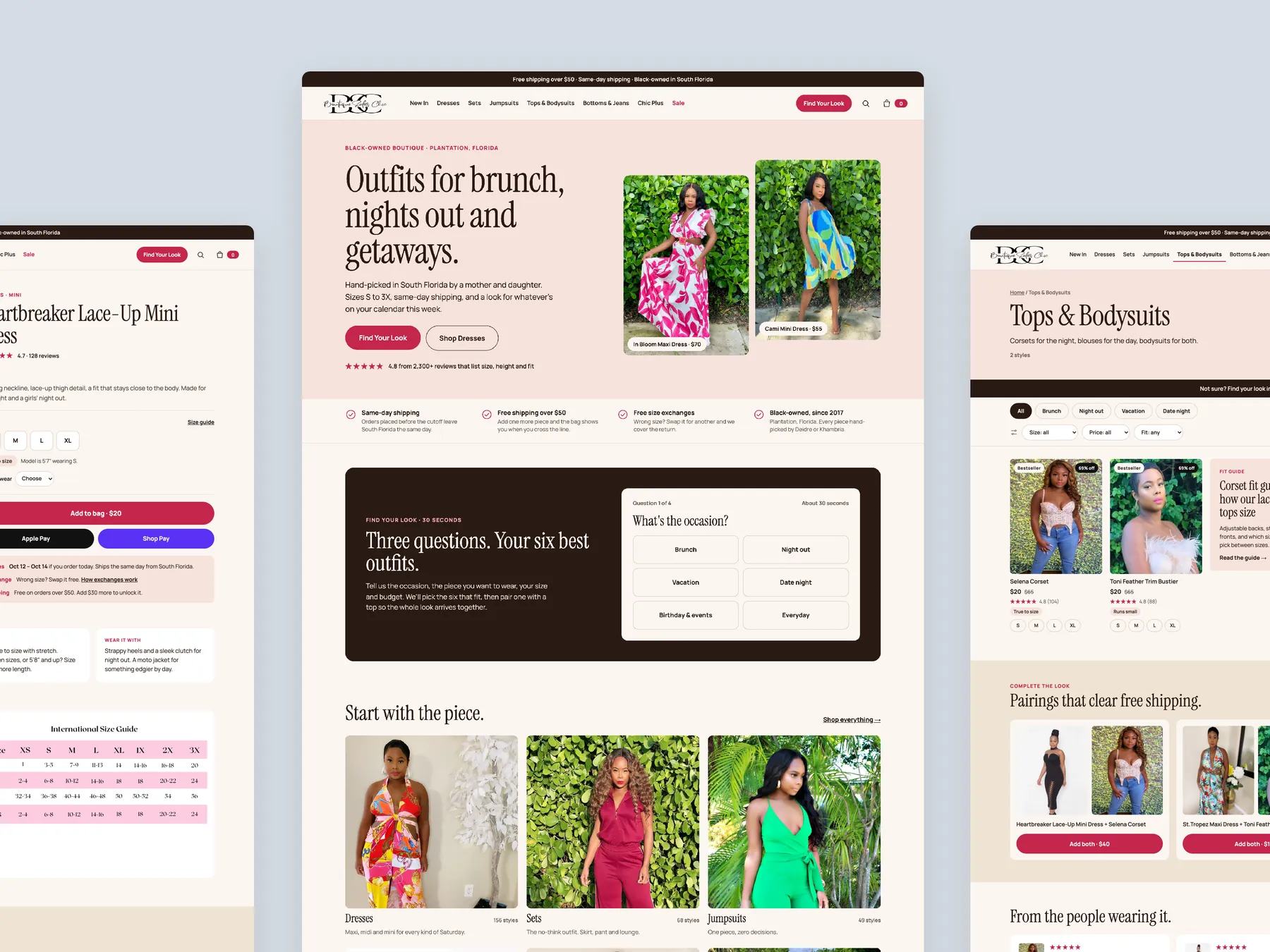
The whole page in two columns: hero that names the occasion, the size range and the shipping promise; the Find Your Look card; family tiles; then the founders' story, gifting, sale and footer.
Storefronts we designed and built, across supplements, fragrance, health, wellness and skincare.
All 35 projectsFour engagements, measured before and after. What changed, why it changed, and by how much.
All case studiesDiagnosis, design and development from one studio — so the recommendation and the build never disagree.
All five services160 real Shopify stores torn down page by page, scored, and shown beside the version we would build. Free to watch.
Browse all teardownsSix conversion-first themes, each built for one industry’s buying journey. Zero required apps, $300, one licence.
Compare all sixA CRO teardown of Boutique Sales Chic, a women's dress boutique with real product photography, covering the homepage, dresses collection and product page, plus a redesigned buying journey.
Pressing play loads the video from YouTube — you can allow it for every teardown under cookie preferences.
Boutique Sales Chic has a strong dress collection and shows it with real photography of the actual garments, which our CRO strategist noted is rare among the stores we review and an immediate edge over shops that lean on generated imagery. The homepage is clean and well built, the collection pages carry a written description, and the product page covers the standard buy box well.
The core problem is that the site behaves like a catalog when it needs to behave like a salesperson. The hero assumes every visitor already knows the brand and arrived to order, then drops straight into new arrivals. A first-time visitor from an ad or a social post gets no answer to who the store is, what it sells, who it is for, or why she should trust it with her money.
The same pattern repeats down the funnel. The dresses collection is a grid of image, name and price with no visual cues, no filters and no way to compare two dresses without opening both. A shopper cannot tell from the card whether her size exists. The product page lists price, instalments and sizes, then stops, with no cross-sell, no reassurance near add to cart and an empty reviews block.
The redesign keeps the same products and photography and changes only the presentation. Navigation by occasion and dress type, a Find Your Look quiz, sizes shown on collection cards, a product page that keeps selling below the buy box and complete the look bundles turn browsing into guided buying. The idea to remember: the website should do what the owner does on the shop floor.
The site works as a catalog rather than a salesperson. The hero assumes the visitor already knows the brand, the collection is a bare grid of image, name and price, and the product page stops selling after the buy box.
A store that asks the shopper what she needs, the way the owner would on the boutique floor, then guides her by occasion, type and size to a dress she trusts will fit, and sells her the complete look before she reaches checkout.
More first-time visitors understand the brand and find a dress that fits them, fewer leave frustrated from the collection grid, and bundles lift the order value, all from the traffic the store already
Five dimensions, each scored out of ten.
13 issues found, 16 fixes proposed.
The homepage hero speaks to returning customers who came back to order. It does not say who Boutique Sales Chic is, what it sells, who it is for or why a stranger arriving from an ad should trust it.
After the hero the page goes directly to the newest dresses. There is no path by occasion or style, so a shopper who wants a date night dress has to scan everything to find one.
The sole route into the range is the Clothing menu, and it does little. Occasion, dress length and product family are not offered as ways into the collection.
Every page shows what is available and waits. None asks the shopper what she needs or explains why a particular dress is right for her, the way the owner would in the boutique.
Below the collection description the dresses page is image, name and price only. No visual cues or details help a shopper decide which of two similar dresses to pick.
To choose between two dresses a visitor must open both product pages, hold the descriptions in her head and compare them herself. The cards carry none of that work for her.
There is no way to narrow the dresses by size, occasion, length or price, so every shopper scrolls the same full grid regardless of what she came for.
A shopper looking for an XL has to click into a dress to find it is not offered in her size. Discovering that after the click is where frustration and exits begin.
The buy box shows name, price, instalments and sizes and nothing more. A shopper who has already decided on one dress is never offered a matching piece or a second dress.
Once a visitor scrolls past add to cart, all that remains is a related products row. Nothing further down answers her doubts or keeps making the case for the dress.
Returns, delivery timing and fit are not addressed near the button. The page assumes the shopper will buy rather than removing her reasons not to.
Dresses without reviews show a customer reviews section asking the visitor to be the first. That signals nobody has bought it yet and works against the trust the section is meant to build.
Whether the dress will fit is the decision point for most shoppers, and the page does not explain how the size runs or help her choose between two sizes with confidence.
Answer who the store is, what it sells, who it is for and why it can be trusted in the first screen. Use a short video of a few dresses in motion as the backdrop instead of a static image.
Ask the occasion, the type of garment, the size and the budget, then show the dresses that match. It is the digital version of asking a shopper how you can help her.
Keep a direct Shop Dresses route for shoppers who already know what they want, placed as the second call to action beside Find Your Look so neither type of visitor is stranded.
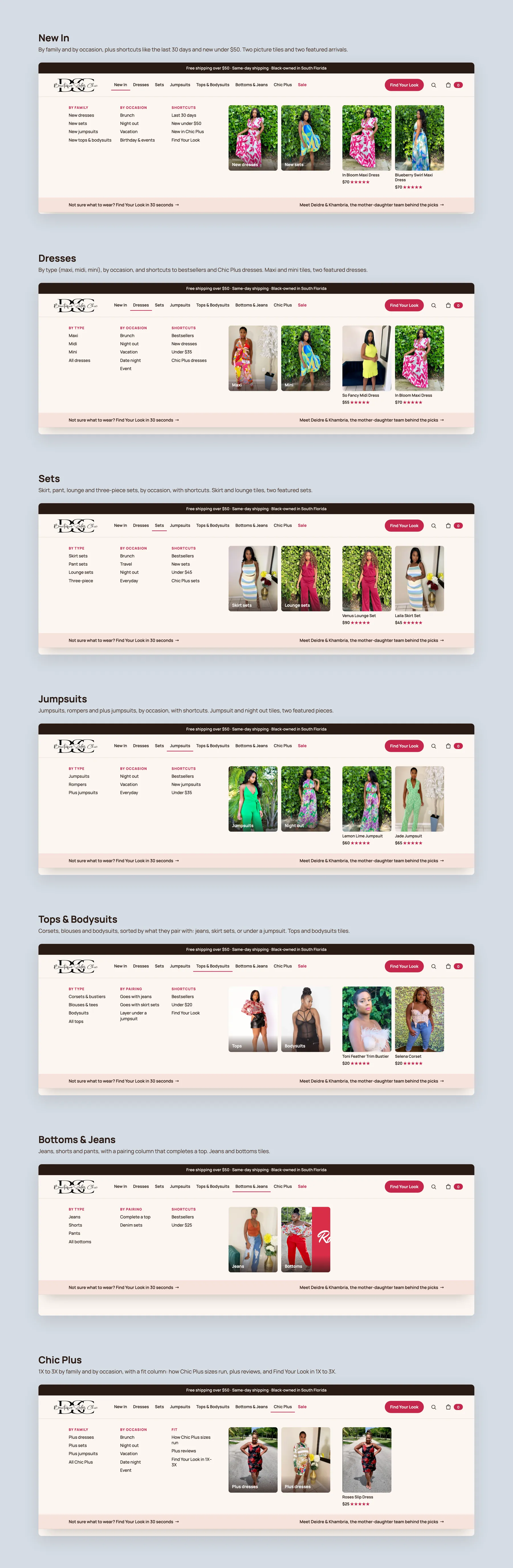
Offer New In, By Family, By Occasion and shortcuts, and split dresses by type so a shopper can go straight to maxi or mini without scanning the whole collection.
Create entry points for brunch, night out, vacation and date night. A shopper who sees her occasion named on the page feels she has already found what she came for.
Let shoppers start from dresses, sets or jumpsuits with a clear tile for each, so the range is understood at a glance before any product grid appears.
Give the homepage a best sellers row, a new arrivals row and one featured dress the store wants to lead with, so social proof does part of the selling.
Introduce the two people behind the boutique with photos and a short story. Knowing who is behind the store is one of the strongest trust signals for a new visitor.
Show which sizes each dress comes in directly on the card, so a shopper looking for an XL never opens a product that cannot fit her and leaves frustrated.
Let shoppers narrow the dresses grid to what fits their body, budget and plans, so the collection page does the finding instead of leaving it to the visitor.
Add the detail a shopper needs to choose between two dresses on the card itself, such as fit notes, fabric and occasion tags, so she does not have to open both pages.
State the returns policy, exchange on fit and delivery timing right next to the button, with a size guide link, so the last doubts are answered at the moment of decision.
Pair each dress with two or three matching or contrasting pieces and offer a small discount or free shipping on the set. One shipment for the store, a saving for her, a higher order value.
Follow the buy box with size and fit detail, reviews, answers to common questions and matching products so the page keeps making the case for shoppers who scroll.
Where a dress has no reviews yet, show reviews from across the store instead of a request to be the first. The section exists to prove the boutique is safe to buy from.
Describe how the dress runs, what the measurements mean and which size to choose when between two, so the fit question stops being a reason to leave.
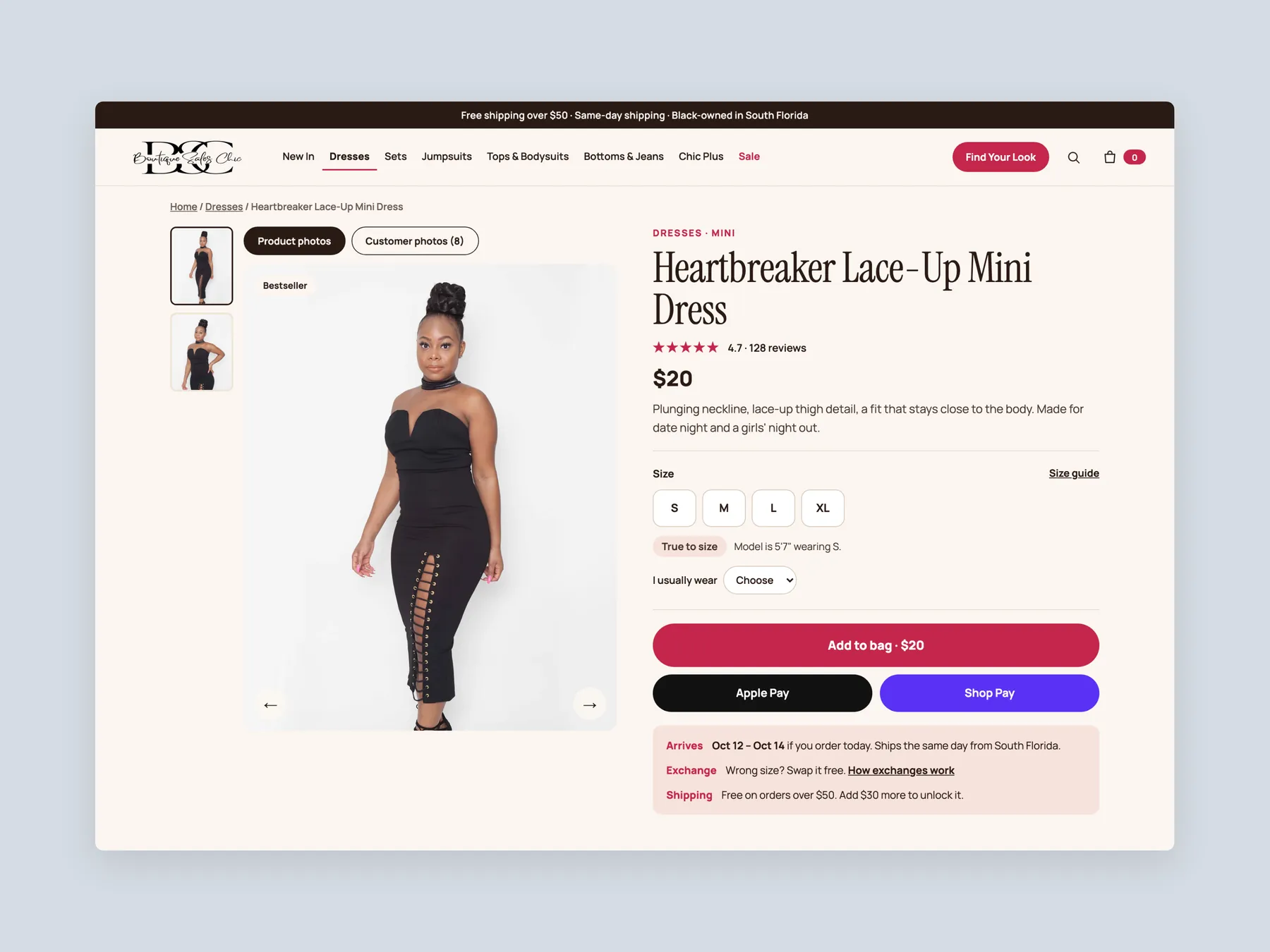
A concept redesign of Boutique Sales Chic, a South Florida dress boutique. Homepage, mega menu, search, quiz, collection, product page and bag, built from the findings of a conversion audit of the live store. The live product page shows a price and two sizes, then leaves her alone. Wrong size is the biggest fear when a woman buys a dress for a specific night, and arriving late is the second. The live page answers neither where she decides. We put the answers beside the button. Fit, delivery and exchange sit under Add to bag, the size guide becomes a module on the page instead of a footer link, the store asks what the occasion is before it shows a grid, and a second piece is offered on the product page and in the bag. Every screen is the store's own photography and voice, with one magenta button and a blush box that holds the answers.
A concept redesign created by Convertica Studio from this audit. It shows how the store could work, it is not the live store.
The whole page in two columns: hero that names the occasion, the size range and the shipping promise; the Find Your Look card; family tiles; then the founders' story, gifting, sale and footer.
The homepage in the centre, the product page's buy column on the left, a collection on the right. One system across every page.
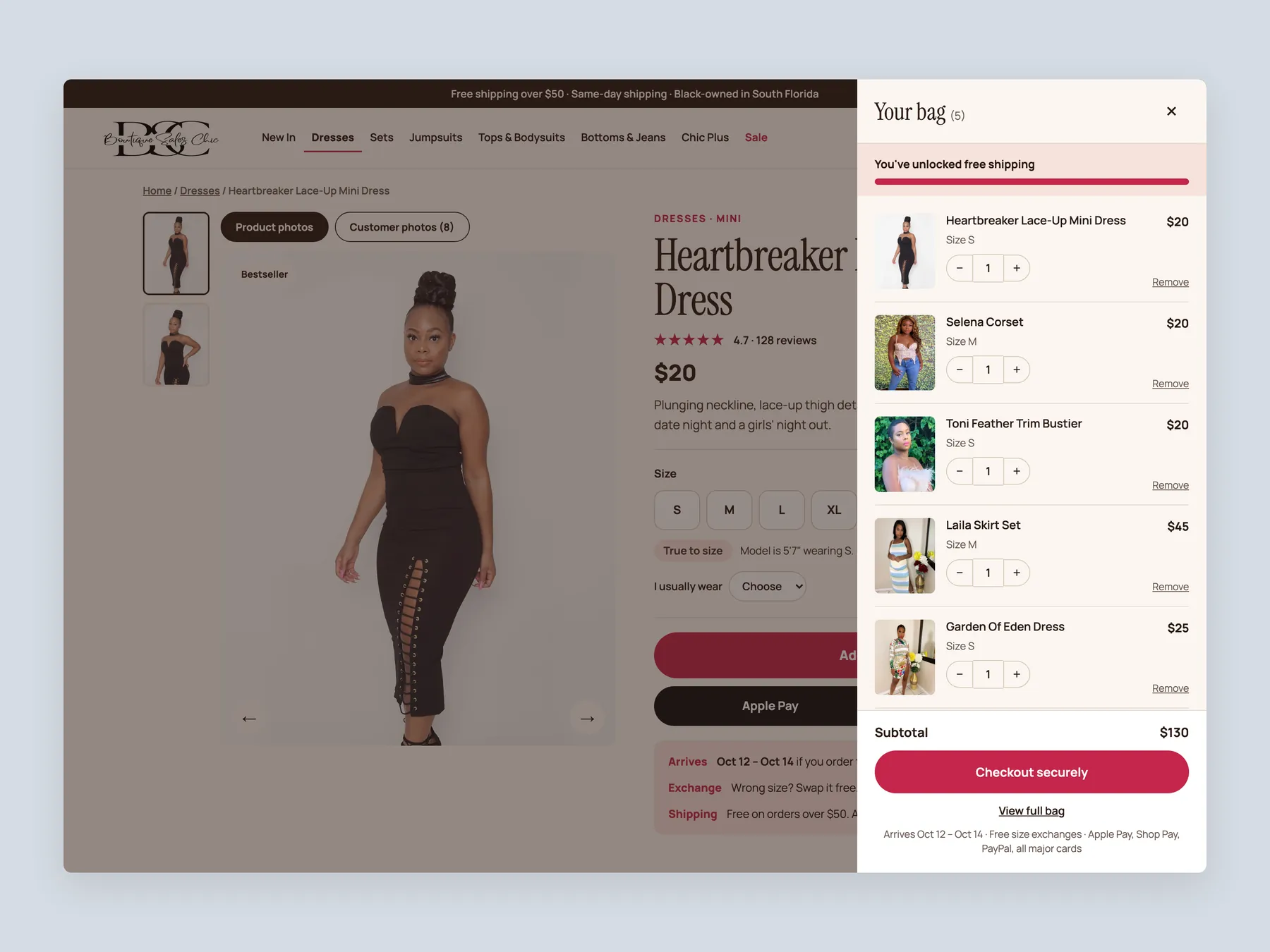
A slide-over, not a page: free-shipping bar at the top, one line per piece with size and quantity, and Checkout securely with the arrival window under it.
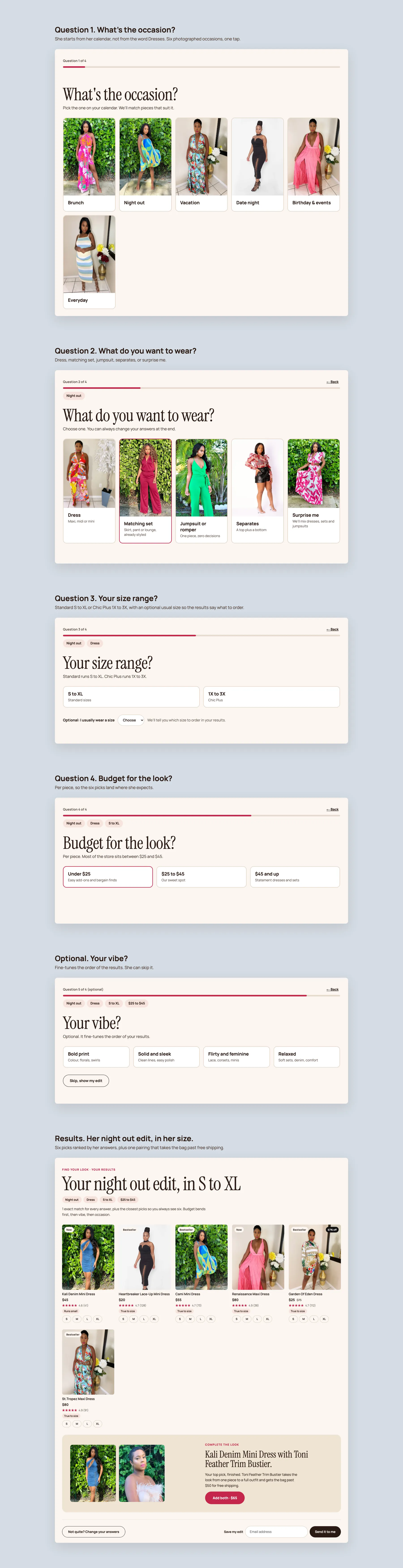
What is the occasion, what do you want to wear, your size range, budget, an optional vibe, then six picks in her size with one pairing that clears free shipping.
The whole page in two columns: buy box with fit and delivery answers, the size and fit module with its meter and table, what to wear with it, reviews with size worn and height, quick answers, more from dresses.
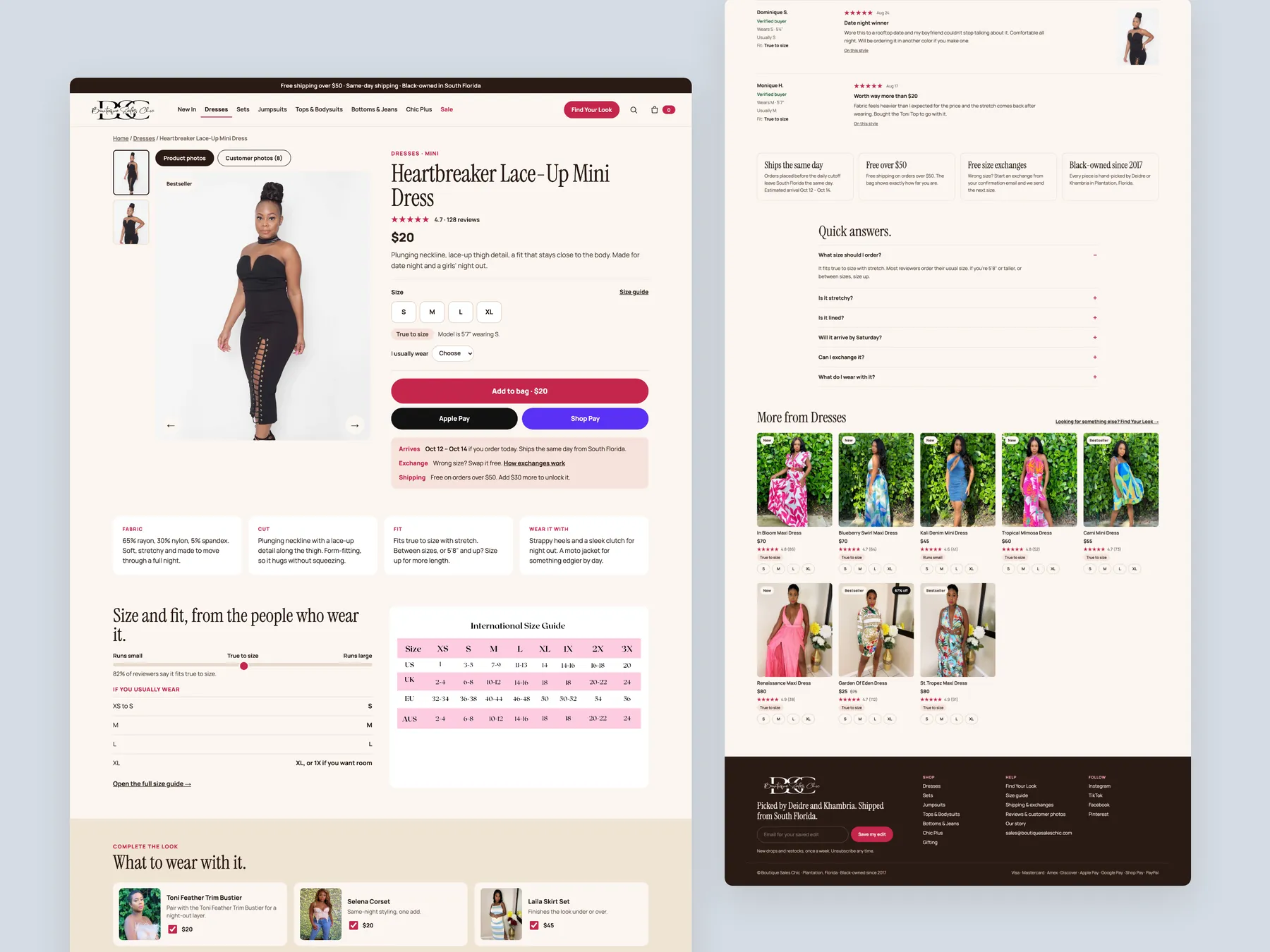
Title, price, size pills, size guide, fit chip, model note, usual size, Add to bag, wallets, and the Arrives, Exchange and Shipping box right under the button.
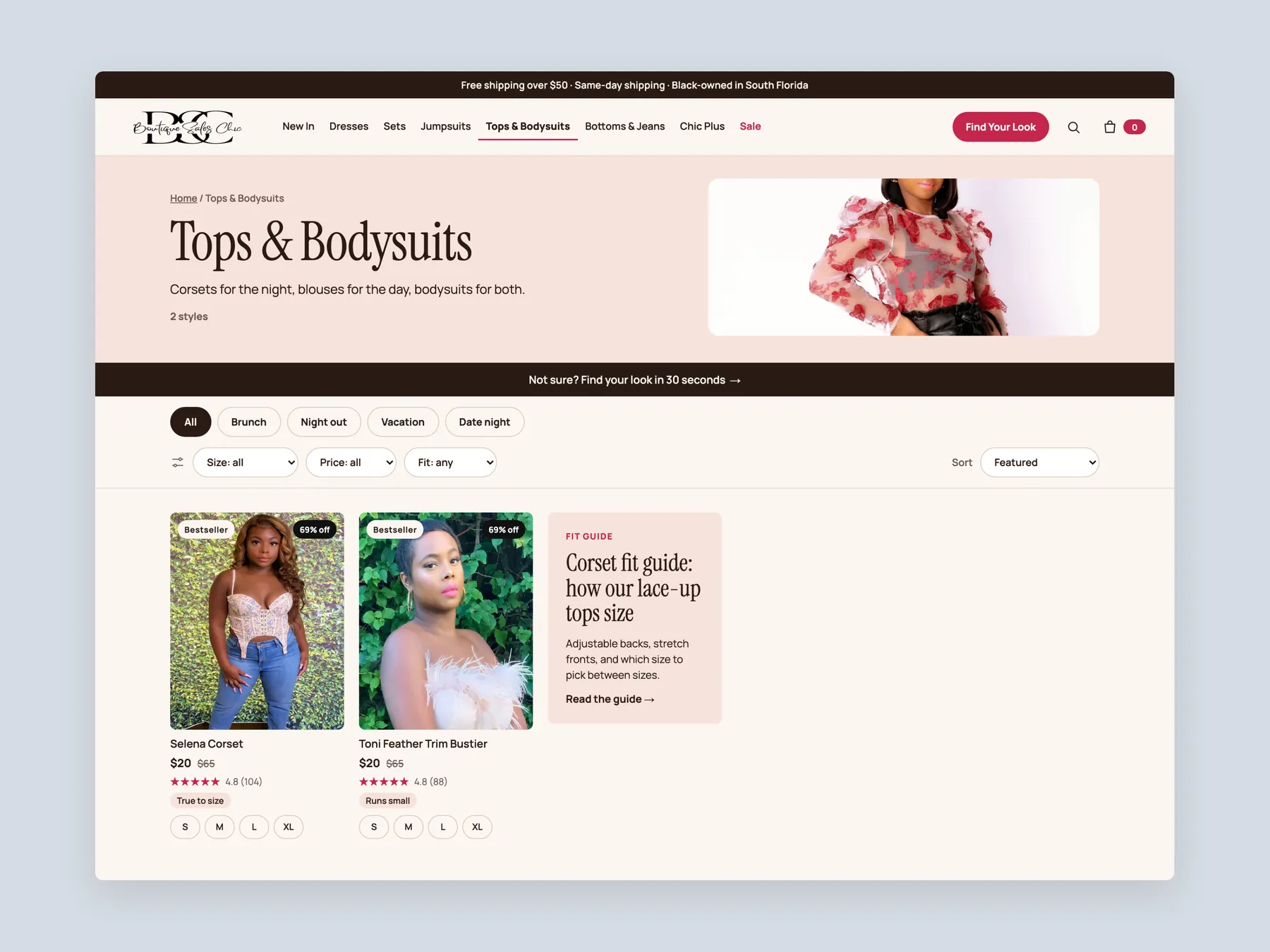
Banner, the Not sure strip that sends her to the quiz, occasion chips, size, price and fit filters, and a fit guide tile inside the grid.
By type, by occasion and shortcuts, two picture tiles and featured pieces, for each of the seven families, Chic Plus with its own fit column.
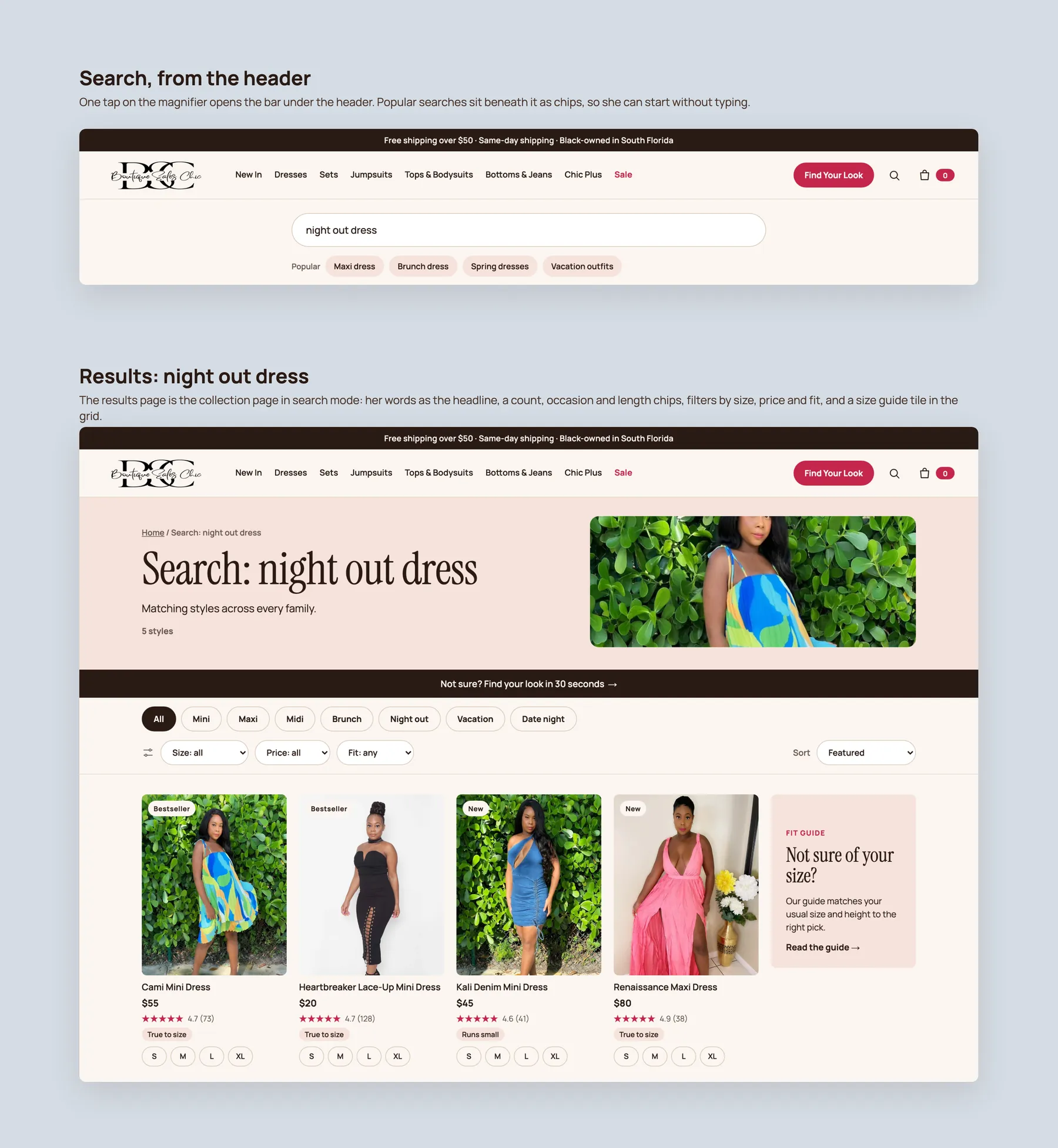
One tap opens the bar under the header with popular searches as chips; the results page carries her words as the headline, a count, length and occasion chips and the filters.
The first screen, the collection with its filter bar, and the product with its pinned Add to bag. One thumb, one decision at a time.
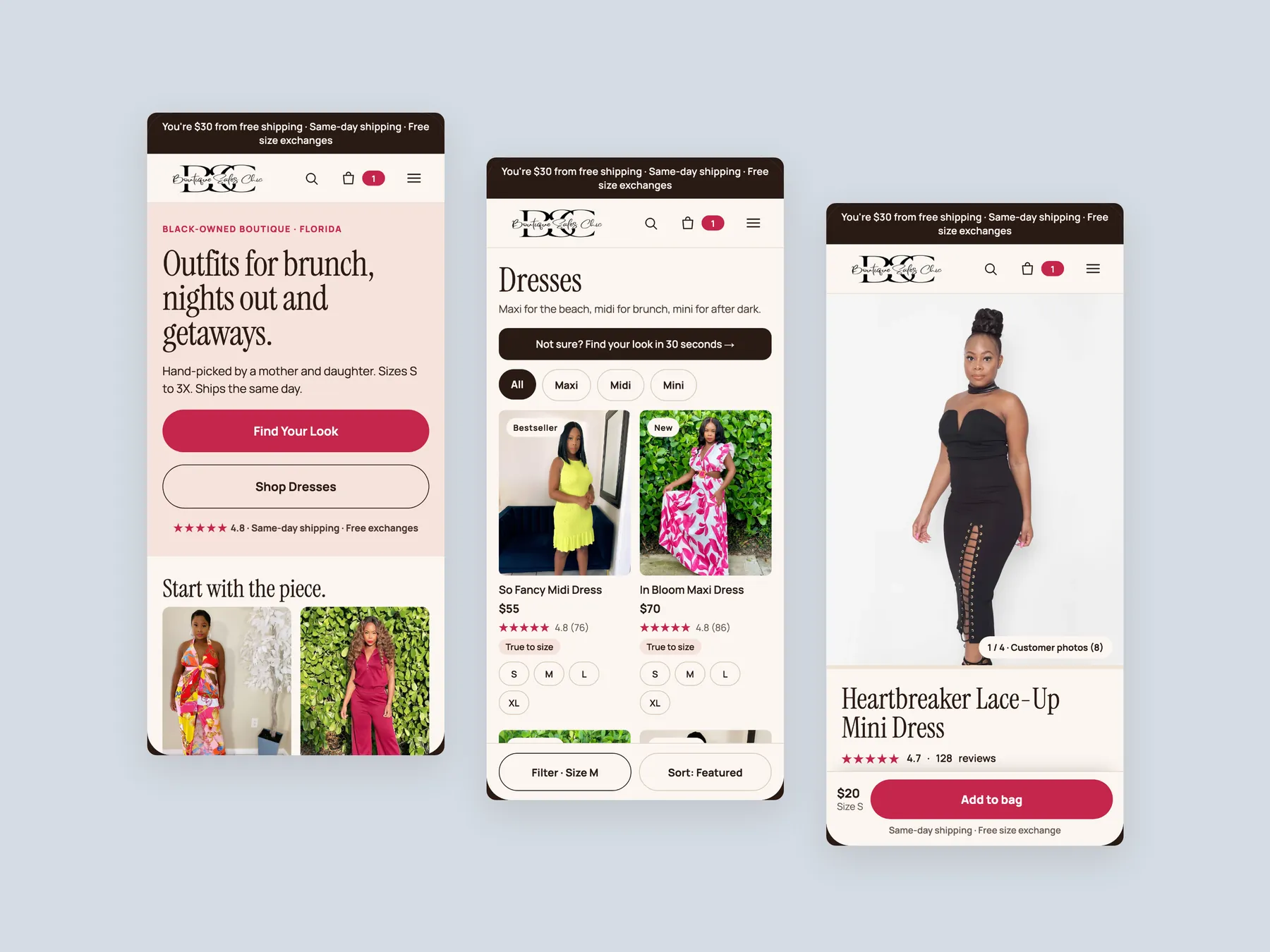
The site behaves like a catalog. It shows the dresses and waits, rather than asking the shopper what she needs and guiding her to it. Our CRO strategist concluded the biggest opportunity is not more traffic but helping existing visitors feel confident enough to buy.
Clean is a good start, but the hero assumes the visitor already knows the brand and came back to order. Most visitors from ads or social media are new, and they need to know who the store is, what it sells, who it is for and why they can trust it before they will look at a product.
In the boutique, the owner would ask a shopper what she is looking for and walk her to the right rail. The website does none of that. It presents a grid and expects a purchase from a name, a photo and a price, so the convincing and the reassurance never happen.
It is the digital version of asking how can I help you. The shopper picks her occasion, the type of garment, her size and her budget, and the store shows the dresses that match. It replaces scanning the whole collection with a short guided path.
It has a helpful description at the top, then becomes a grid of image, name and price. There are no filters, no visual cues and no detail on the cards, so a shopper torn between two dresses has to open both and compare the descriptions in her head.
Right now a shopper has to click into a dress to learn it is not made in her size. She arrived ready to buy, with the money and the intent, and the site frustrated her at the last step. Showing sizes on the card means she only opens dresses that can fit.
Put returns, delivery timing and a size guide beside the add to cart button. Add complete the look bundles. Keep selling below the buy box with fit detail, reviews, answers to common questions and matching products instead of stopping at a related items row.
Once a shopper has decided on one dress, the hard work of convincing her is done. Offering two or three matching pieces with a small discount or free shipping on the set sells more to one person in one shipment. Three dresses to one shopper beats one dress to three shoppers.
Do not show a block asking the visitor to be the first, which signals that nobody has bought it. Show reviews from across the store instead. The purpose of the section is to prove the boutique is safe to buy from, not to grade one product.
No. The redesign uses the same dresses, the same real photography and the same brand. Only the presentation layer changes: how the store is introduced, how shoppers find products, what the cards show and how the product page reassures and sells.
They can try, and the recording is honest that this is where many owners get stuck. Fixing one thing at a time rarely reproduces the whole journey and leads to frustration. The alternative is to have Convertica Studio build the full optimized experience, which is discussed on a short call.
The recording runs 29 minutes. It covers the homepage, the dresses collection page and a product page on boutiquesaleschic.com, then walks through a redesigned version of all three and closes with next steps and how to book a call.
Tell us about your store and we'll send a personalized 5-minute video showing exactly where you're losing buyers — and how to win them back.
Takes about 40 seconds. No call required.