Homepage
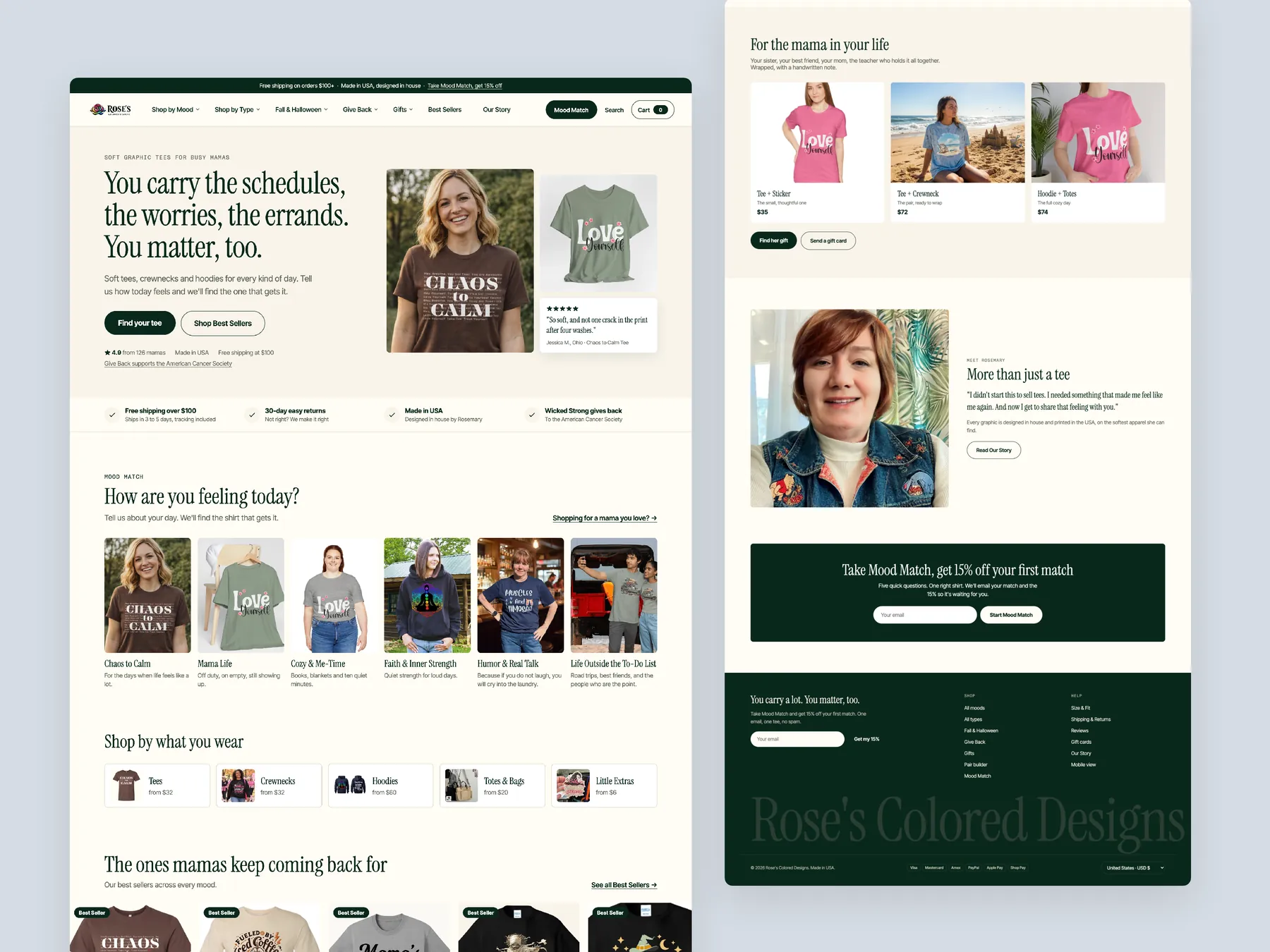
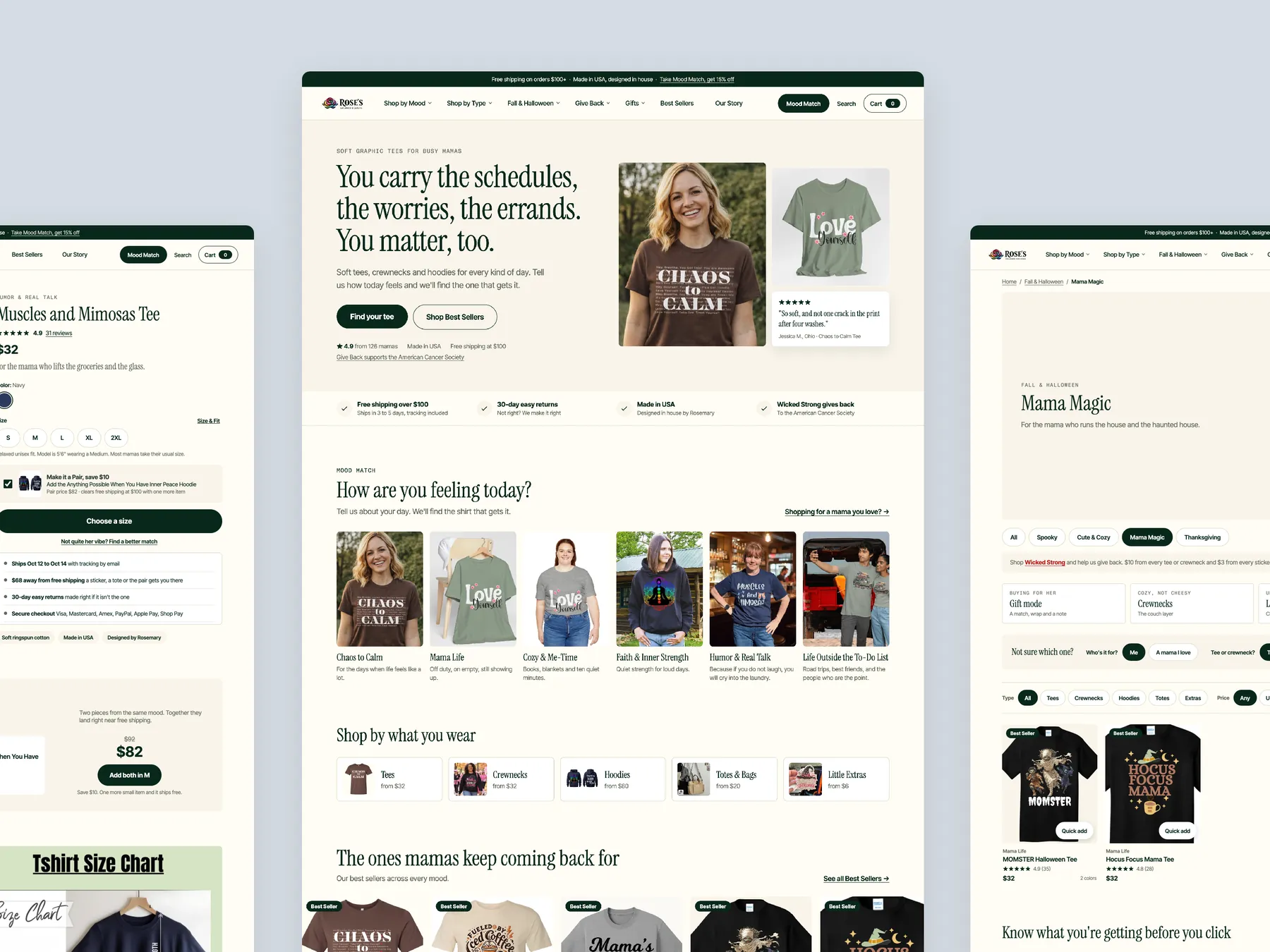
You carry a lot, you matter too: the hero with the range under it, shop by mood, best sellers, make it a pair, the give-back story, reviews and the footer, shown as two tall columns.
Storefronts we designed and built, across supplements, fragrance, health, wellness and skincare.
All 35 projectsFour engagements, measured before and after. What changed, why it changed, and by how much.
All case studiesDiagnosis, design and development from one studio — so the recommendation and the build never disagree.
All five services160 real Shopify stores torn down page by page, scored, and shown beside the version we would build. Free to watch.
Browse all teardownsSix conversion-first themes, each built for one industry’s buying journey. Zero required apps, $300, one licence.
Compare all sixA CRO teardown of Rose's Colored Designs covering the homepage, collection page and product page, plus a redesigned concept built around a guided buying path for mama themed tees and gifts.
Pressing play loads the video from YouTube — you can allow it for every teardown under cookie preferences.
Rose's Colored Designs sells mama themed tees, crew necks, hoodies, totes and stickers, and the products themselves are not the issue. The homepage already features the founder, a give back program that sends $10 from every tee and $3 from every sticker to the American Cancer Society, free shipping over $100, and a review section. The site is built cleanly and most of the ingredients are already there.
The problem is how the site presents all of this. A visitor landing on the hero learns that the store sells tees and little else. The hero does not say who the brand is for or why to trust it, and the line about 150 plus happy customers links to nothing. The Shop menu lists moods like Mama Life rather than products, so hoodies, totes and stickers stay hidden until someone scrolls.
The same pattern carries down the funnel. Collection pages act as a catalog: a name, a price, and an add to cart button that only appears on hover. There is no way to compare tees without opening each product. On the product page, a long run of images pushes the details down, reviews are missing, and nothing explains why a tee costs $33 when shoppers can find tees on Amazon or Etsy.
The redesign turns the site into the salesperson a physical shop would have. A finder asks who the shirt is for, what kind of day it is and what size, then recommends products. Collections get filters and self explanatory cards, and product pages carry reviews, fabric and shipping details next to the cart. The store does not need more traffic yet; it needs to guide the visitors it already has.
The site shows its products but does not guide anyone to them. The hero does not say who the brand is for, the menu lists moods instead of product types, and product pages do not explain the price or show reviews.
Rose's Colored Designs could work like a good shopkeeper online. It would ask what the visitor needs, recommend the right tee, hoodie or tote, show proof from real customers, and suggest matching pieces so one visit becomes a fuller order.
Visitors would understand the brand from the hero, find the right product without opening page after page, and reach checkout with their questions about fabric, shipping and price already answered.
Five dimensions, each scored out of ten.
15 issues found, 18 fixes proposed.
The hero image and the fall and Halloween tees line show that the store sells clothing. They do not say who the brand is for, why it is different, or where a visitor should go next.
The line saying the store is loved by 150 plus happy customers sits under the hero but leads nowhere. Visitors cannot see who those customers are or what they bought, so the number reads as a claim with nothing behind it.
Hovering over Shop shows labels like Chaos To Come and Mama Life. They give the feel of the brand but never mention that the store also sells hoodies, crew necks, tote bags and stickers.
The homepage lays out what is available but gives no guided routes by need, recipient or occasion. Visitors have to work out on their own where to start.
Lines like You Carry The Schedules, The Worries and Feel Seen, Feel Comfortable are well written. They still do not tell the visitor what is inside each section or which products it leads to.
The store has a five star review section and real customer feedback, but it sits at the end of the page. Most visitors form an opinion about trust long before they scroll that far.
Each collection shows a grid of images with a name and a price. Nothing helps the visitor narrow down by style, fit, price or recipient, so finding the right tee depends on scrolling and guessing.
The add to cart button on collection cards stays hidden until the visitor hovers over the product. Shoppers who do not hover see no direct way to buy from the collection page.
To compare tees across collections, a visitor has to open each collection from the menu, then each product, to check size, description and contents. That takes a lot of effort before anything goes in the cart.
The product cards do not show ratings, review counts or any sign that someone has bought that shirt before. The trust signals below the grid are not clickable.
The page where the visitor decides to buy shows no reviews at all. The store has reviews on the homepage, but none of them appear where the decision is made.
Several big product images come before the information shoppers need. Visitors have to scroll past them to reach sizing, the secure checkout note and the product details.
The secure checkout note sits next to the cart button, but nothing there says when the order will arrive or what fabric the shirt is made from. Shoppers have to read through long text to find it.
The price is shown without any reason behind it. Tees are sold everywhere from Amazon to Etsy, and the page does not say why this one is worth buying here.
The related products at the bottom of the product page repeat the catalog pattern. Visitors see more images and more reading, with no reason given for why these items go together.
Use the hero to say that this is a founder led mama apparel brand, who it is for, and why to trust it. Put review stars and the give back promise right beside the headline.
Give visitors a prominent button to shop bestsellers and a second one to open a product finder. That way both decided and undecided shoppers have an obvious next step.
Turn the 150 plus happy customers line into a link to reviews and customer photos. That way the number has visible proof behind it.
Organise navigation by mood, body type, season, product type, gifting and give back. A shopper looking for hoodies can then reach them in one click instead of scrolling the whole homepage.
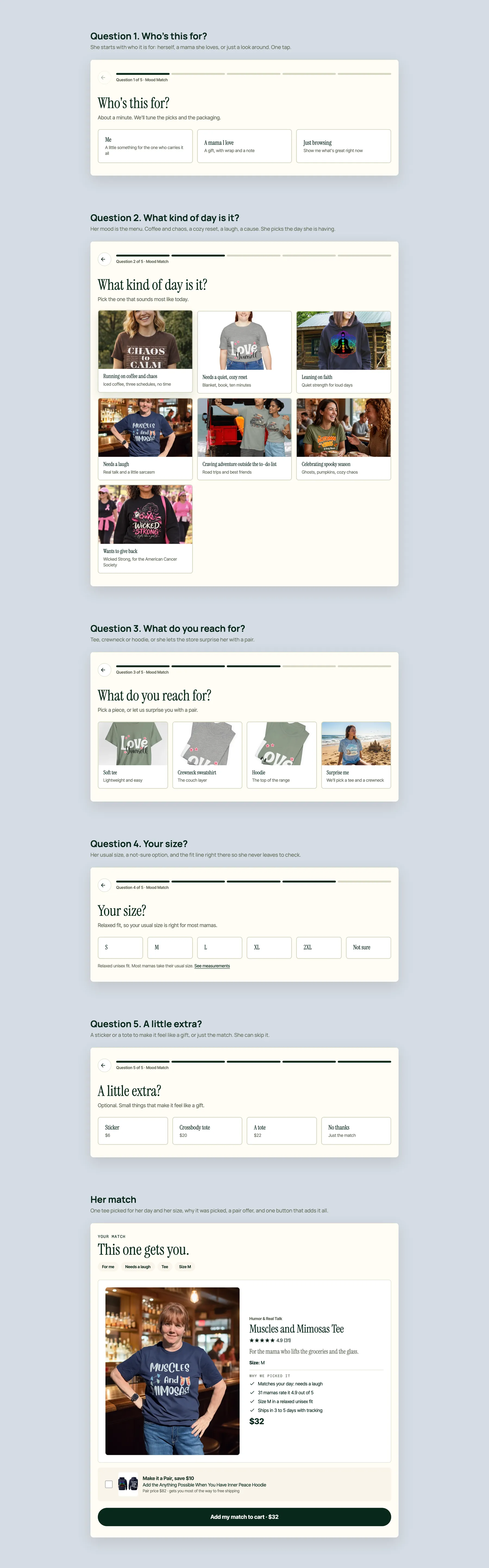
Add a short quiz that asks who the shirt is for, what kind of day they are having, the style they want and their size. Then recommend matching products, with an optional sticker or other little extra.
Turn the existing feeling copy into clickable routes such as Cozy and Me Time. Each one should open a collection of the tees that fit that mood.
Add a shop by what you wear section listing tees, crew necks, hoodies, totes and bags, and little extras like stickers. Visitors then learn the full range in seconds.
Bring the five star reviews and customer photos up the homepage, near the hero and bestsellers. Proof should appear before the visitor has to decide whether to keep browsing.
Show the image, a line on what the item is, the star rating, the price, any other available colours, and an add to cart button that is always visible without hovering.
Put category filters and sorting options at the top of every collection. Shoppers can then compare tees, hoodies and crew necks side by side without opening fifteen or twenty pages.
Add a short you know what you are getting section, a review block and frequently asked questions under the grid. That answers common doubts before the visitor clicks into a product.
Put the name, rating, price, colour and size chart at the top of the product page. Visitors can then choose a size without scrolling past every photo.
When a product has no reviews of its own, show storewide reviews with photos and comments. Shoppers then see that others have bought from the store and were happy.
Next to the add to cart button, say that tracking is sent by email and when to expect delivery, and state the returns policy and secure checkout. That answers the last questions before purchase.
Explain what the $33 pays for, such as soft ring spun cotton, the print quality, made in USA, and designed by the founder. Add care details so the quality is clear.
Let shoppers pair the tee with a second shirt or a hoodie for a saving, and offer gift wrap with a handwritten note. One visitor then leaves with more than one item.
Recommend items that go with the product on the page, such as a matching crossbody tote. Give a reason for each suggestion instead of showing another generic grid.
Add a gift section that suggests tees for a mom, sister or friend. Shoppers browsing for themselves will then think of buying for someone else too.
A concept redesign of Rose's Colored Designs, a graphic tee, crewneck and hoodie brand made for busy moms, designed in house and printed in the USA. Homepage, mega menu, the Mood Match quiz, collection, product page, search and cart, built from the findings of a conversion audit of the live store. The live store says "we see you" on the homepage and then shops like a catalogue. The menu is a flat list of mood names she has not learned yet, the collection page has cards and no words, and the product page offers a title, a price, a size picker and a button with nothing on fabric, fit or what others thought. The store asks what kind of day she is having before it shows a grid: a five-question Mood Match, a mood section on the second screen of the homepage, and a mega menu organised by mood, by type, by season and by gift. The buy box carries the fit line, the shipping and returns facts and a pair offer above the fold, and the cart tracks her to free shipping.
A concept redesign created by Convertica Studio from this audit. It shows how the store could work, it is not the live store.
You carry a lot, you matter too: the hero with the range under it, shop by mood, best sellers, make it a pair, the give-back story, reviews and the footer, shown as two tall columns.
The homepage in the centre, the product page buy column on the left, the Mama Magic collection on the right.
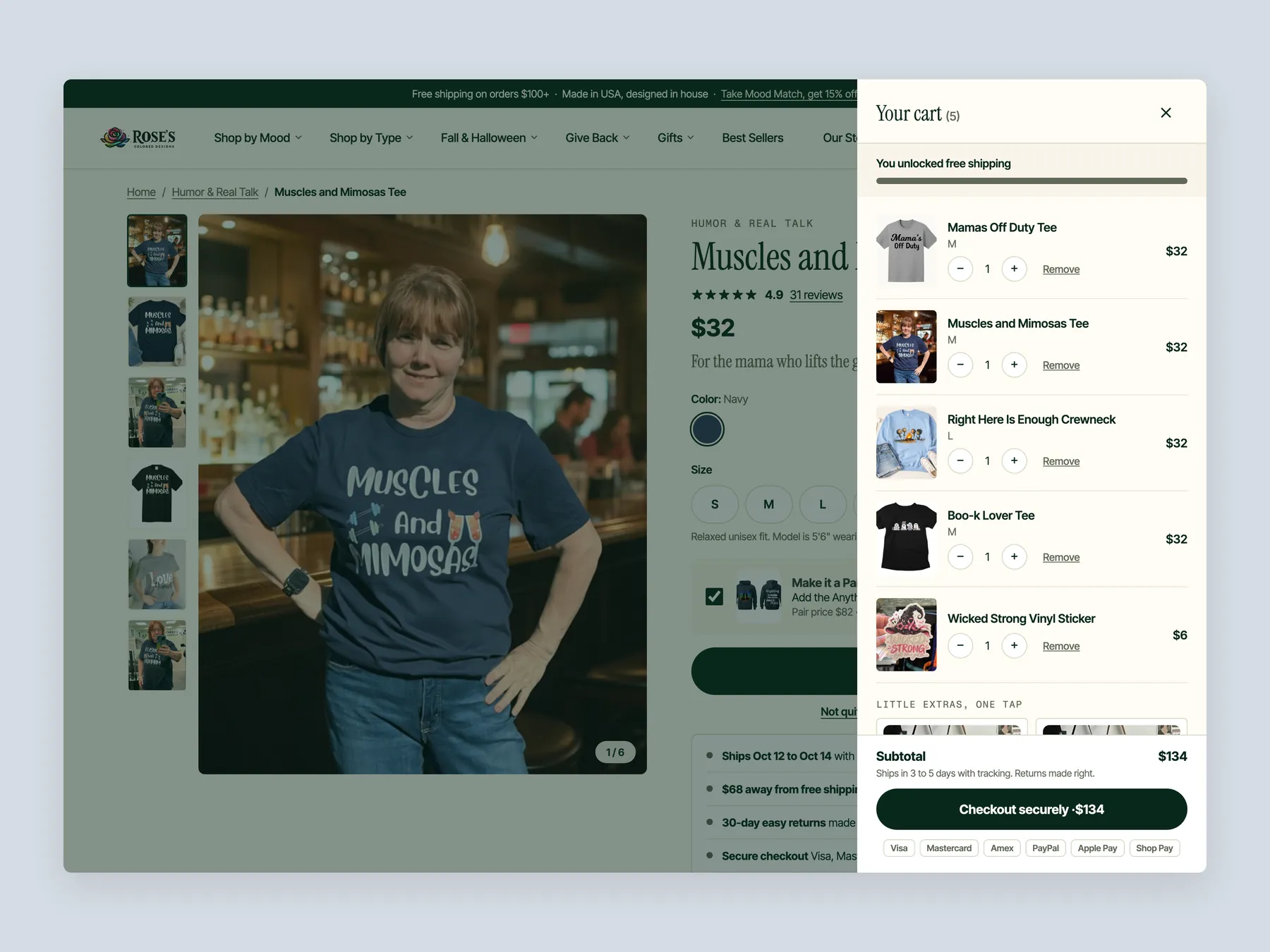
A slide-over with the free-shipping bar, five lines, the add-ons and the gift wrap toggle, open over the dimmed product page.
Who is it for, what kind of day it is, what she reaches for, her size, a little extra, then her match with why it was picked and one button to add it all.
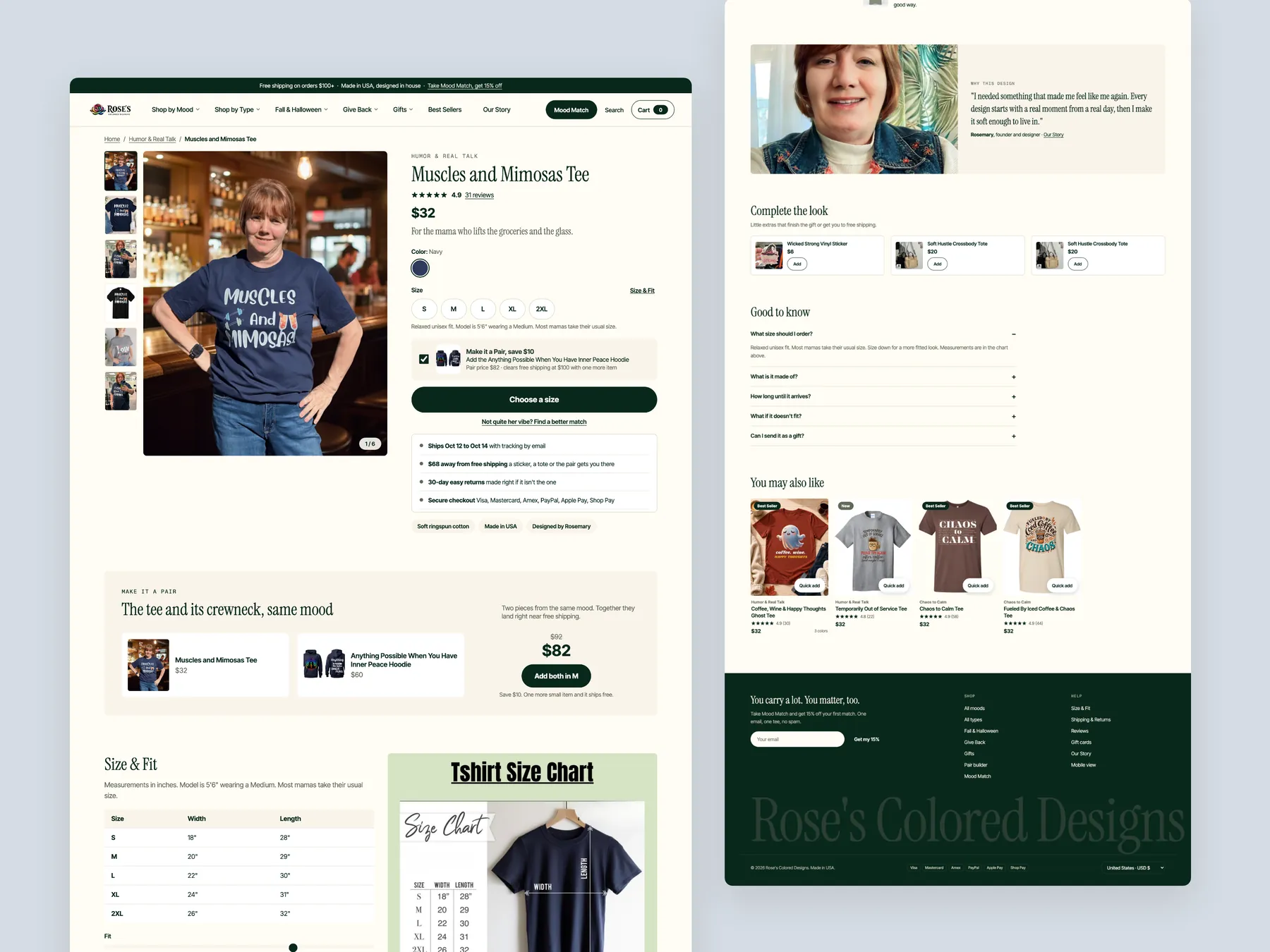
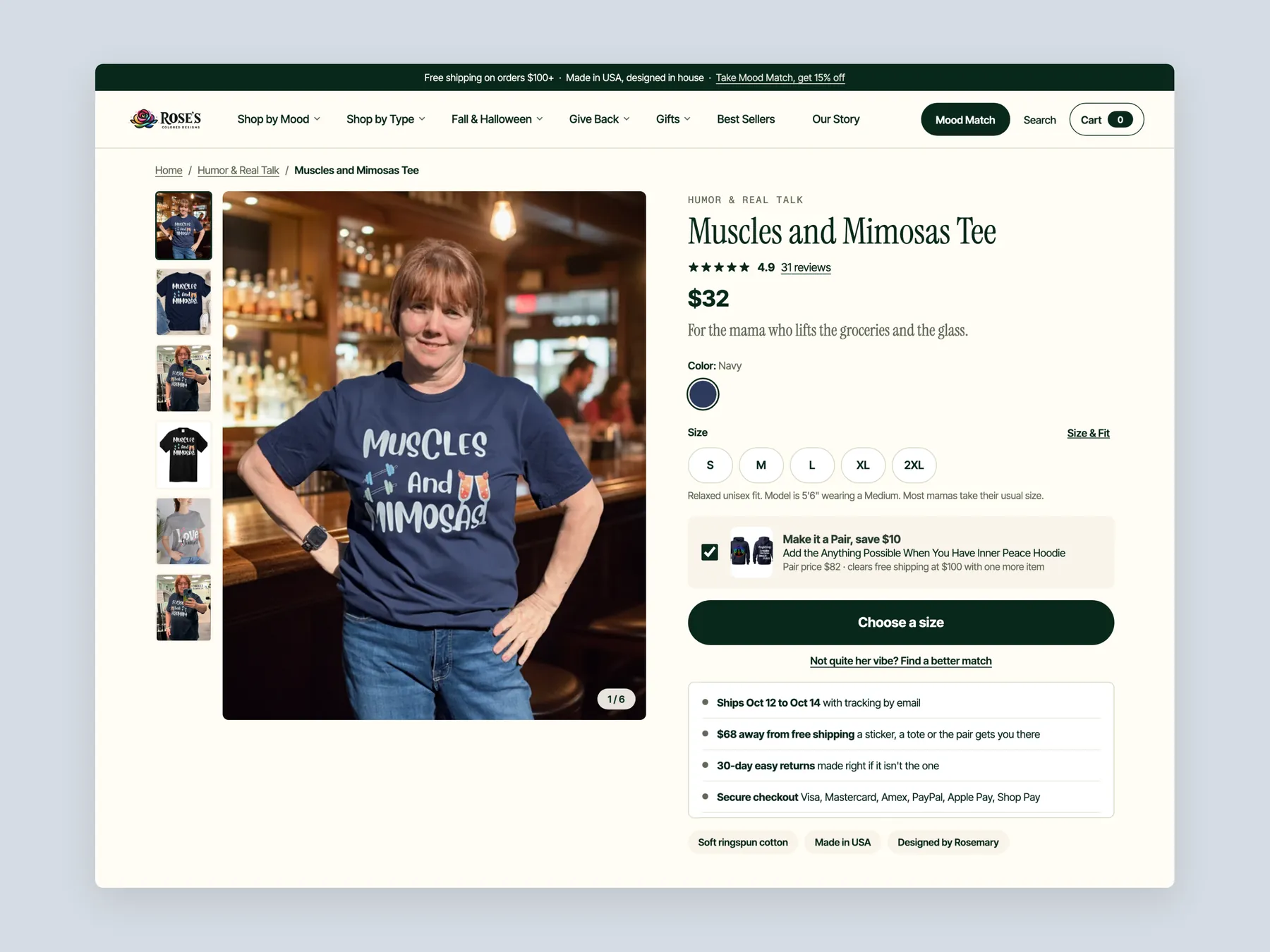
Buy box, size and fit, make it a pair, reviews with photos and sizes bought, the founder's story card, add-ons and questions, shown as two tall columns.
Mood tag, title, rating line, one sentence about who it is for, sizes with the Size & Fit link, Add to cart, and the shipping, free-shipping and returns lines right under the button.
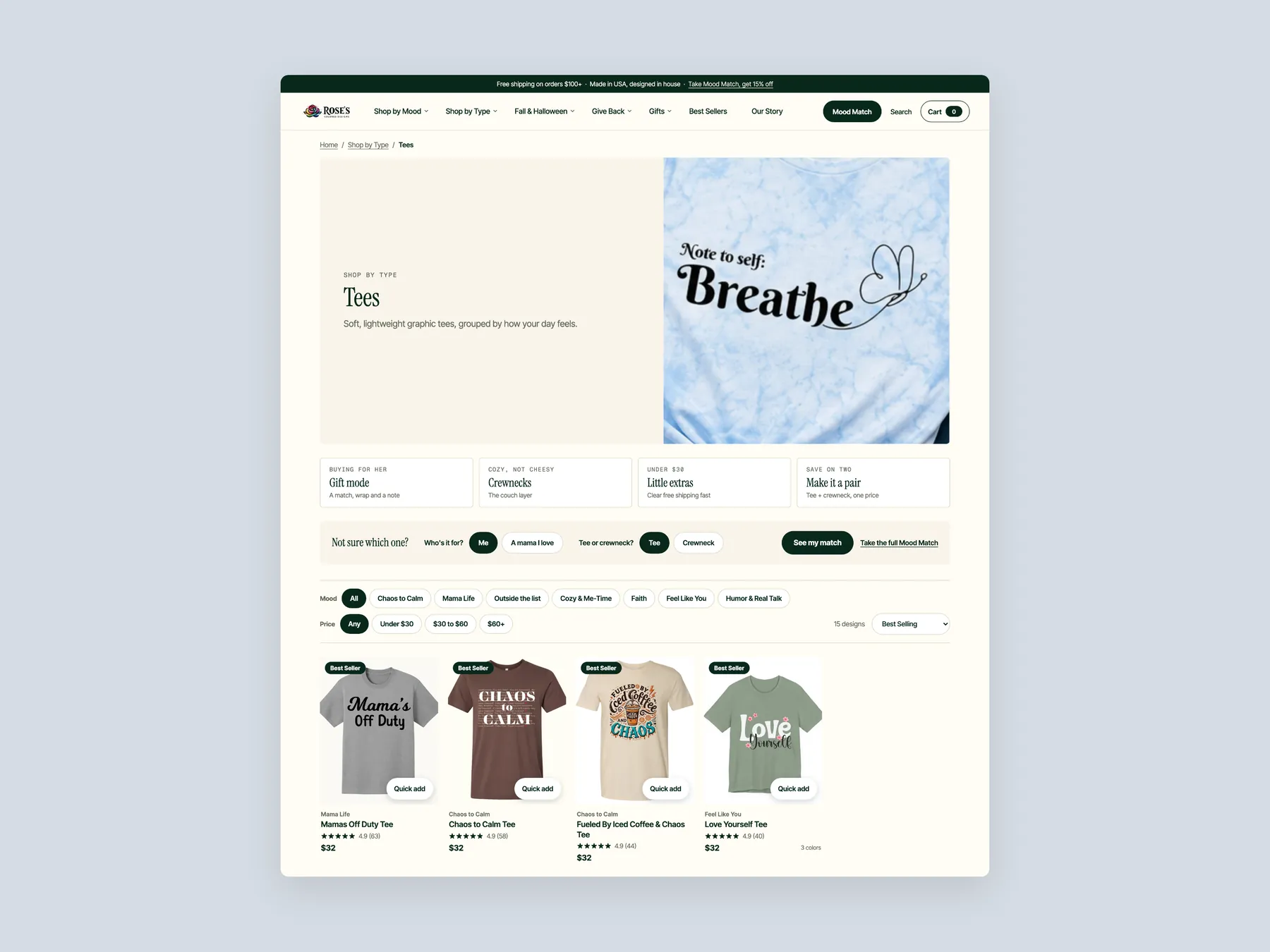
The Tees page: intro banner, four ways in, the two-question Mood Match strip, mood and price filters, and the first row of cards with mood tags and ratings.
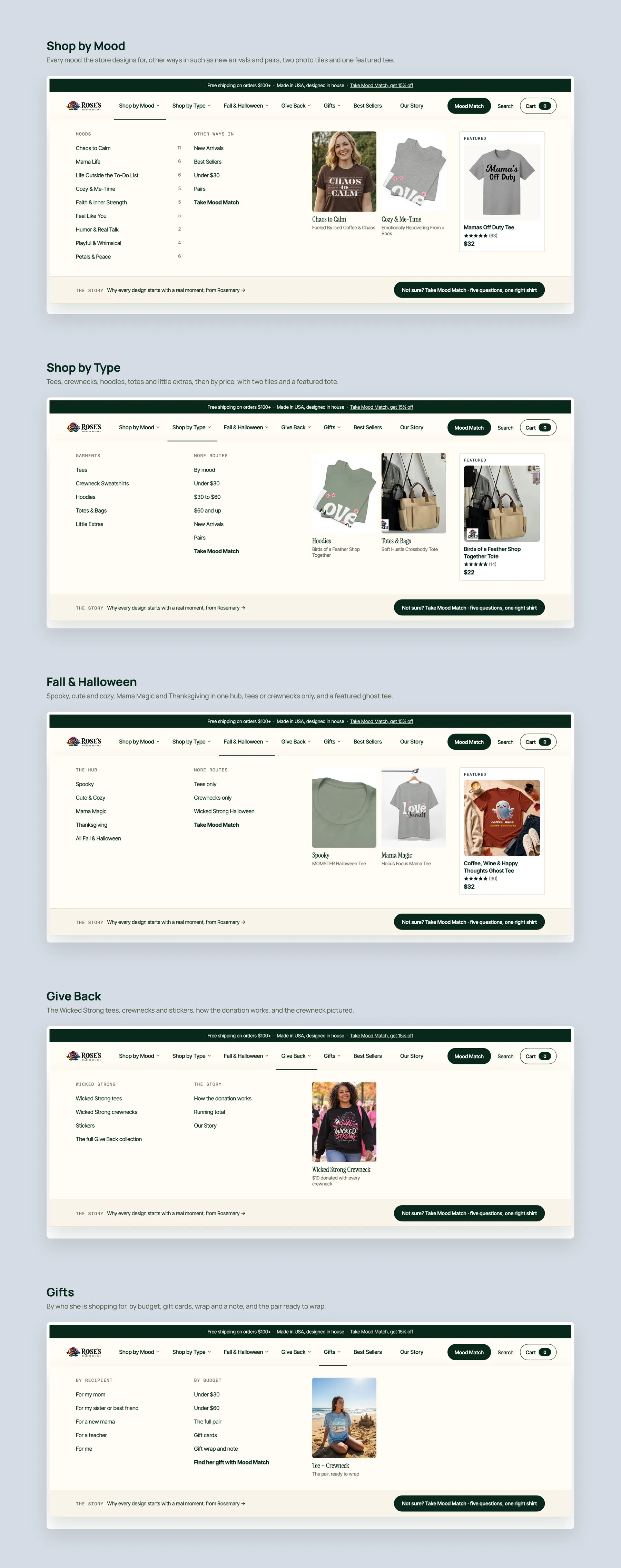
Shop by Mood, Shop by Type, Fall & Halloween, Give Back and Gifts, each with its link columns, photo tiles and featured piece.
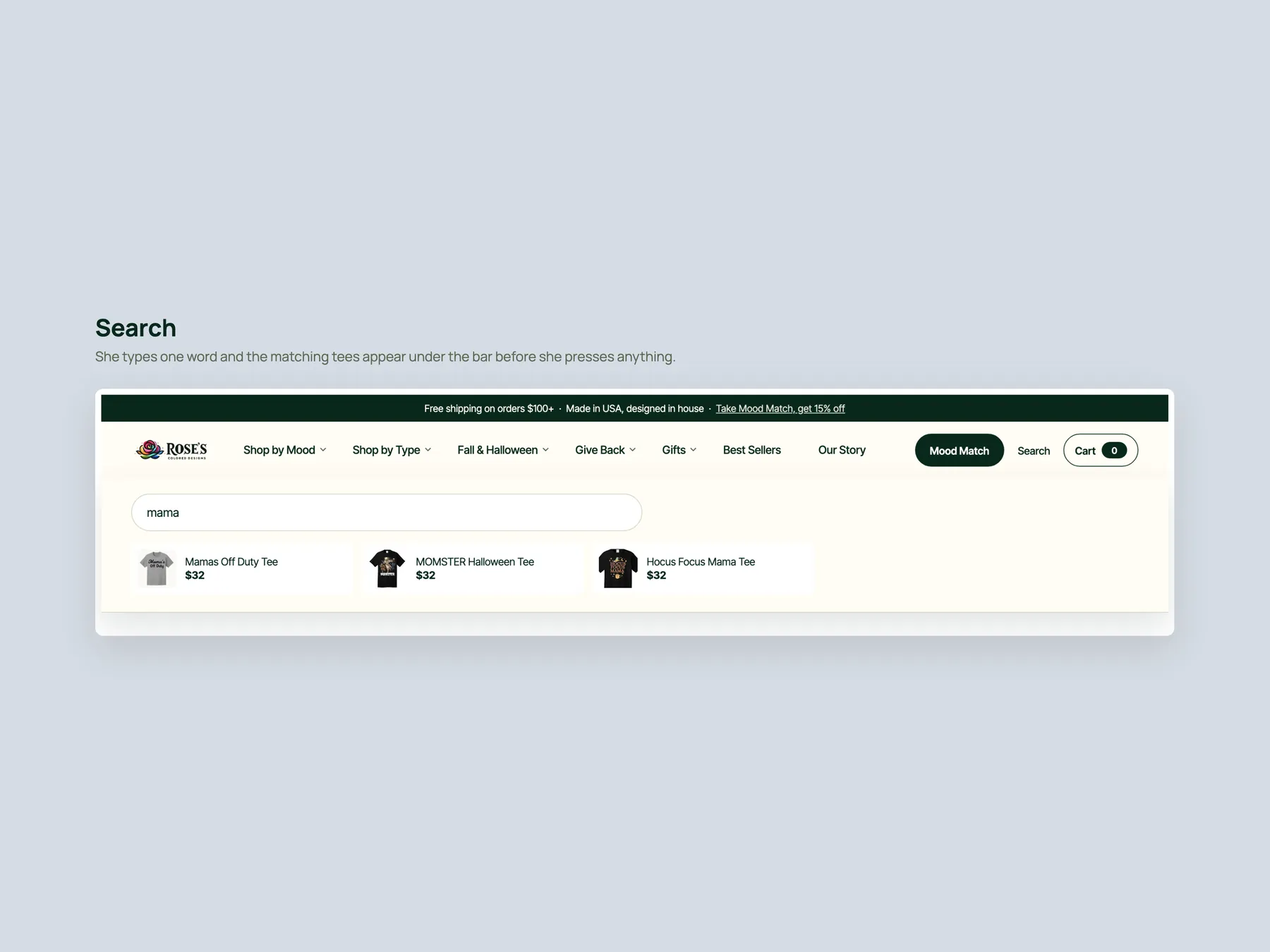
The bar opens under the header and the matching tees appear inline as she types.
The home first screen, the collection with the filter sheet open, and the product page with its pinned Add to cart bar.
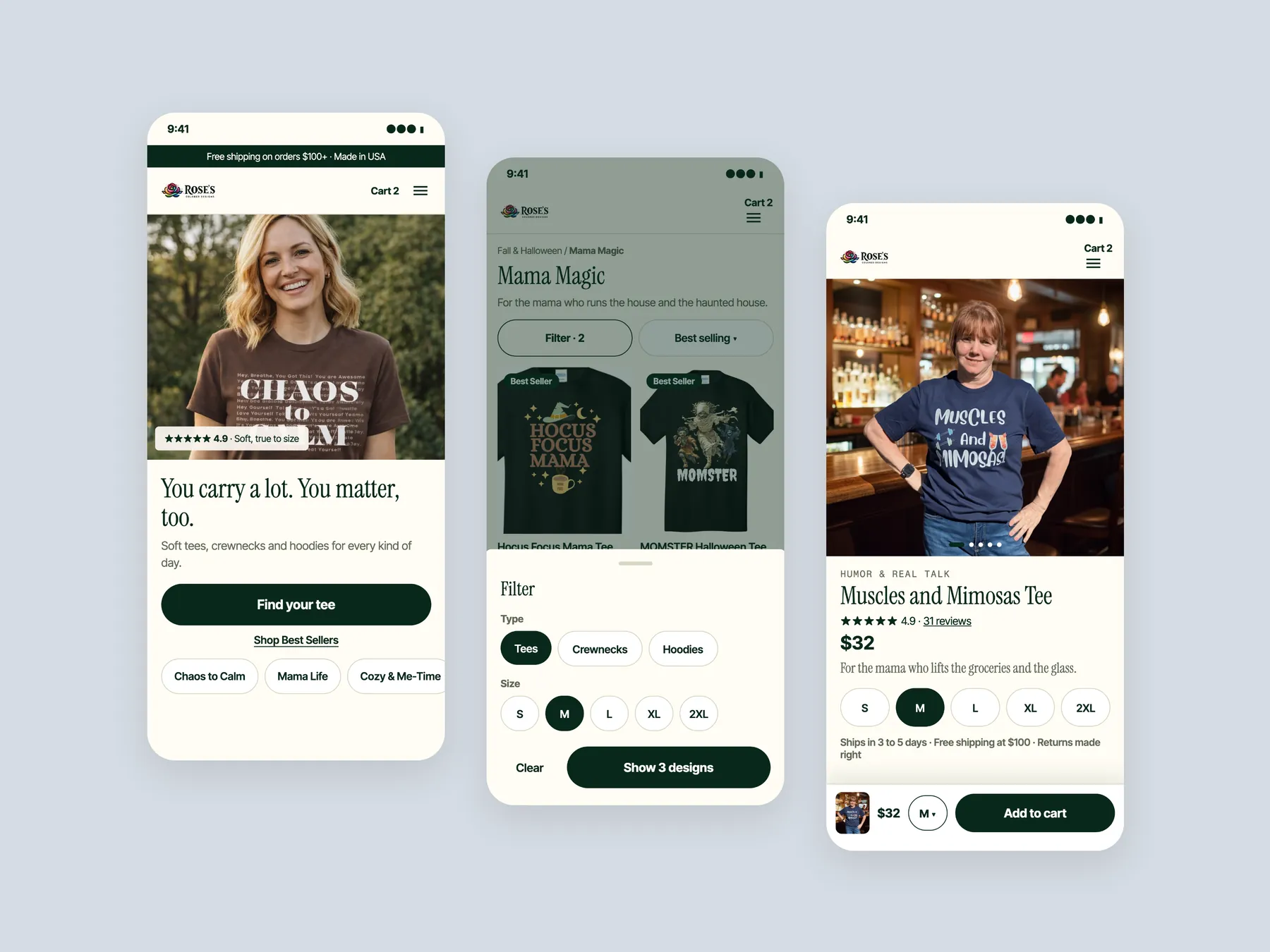
The site shows its products but does not guide visitors to them. The hero, menu and collection pages tell shoppers what exists without helping them pick something. The products themselves were not the issue.
The founder appears on the homepage, which shows that a real person runs the business. The give back program to the American Cancer Society, free shipping over $100, a review section and a clean overall build are all strengths. The product page already tries to upsell, which many stores never do.
A visitor decides in the first few seconds whether a store is for them and whether to trust it. The current hero only shows that the store sells tees. The redesign puts who it is for, reviews and two clear next steps in that first view.
It lists moods such as Mama Life and Chaos To Come rather than product types. A visitor would not learn from it that the store also sells hoodies, crew necks, totes and stickers. The redesign organises the menu by mood, body type, season, product type and gifting.
It is an online version of a shopkeeper asking how they can help. It asks who the shirt is for, what kind of day they are having, the style they want and their size, then recommends products. It can also offer a small add on such as a sticker.
The store has reviews, but they sit at the bottom of the homepage and are missing from the product page. The audit recommends moving them higher on the homepage and adding storewide reviews to every product page. That way proof is visible where decisions happen.
Product cards gain a description line, star ratings, colour options and an add to cart button that is always visible. Filters and sorting let shoppers compare items side by side. Reassurance copy, reviews and FAQs are added under the grid.
It explains the fabric, print, care and origin, such as soft ring spun cotton, made in USA and designed by the founder. It also puts shipping, tracking and returns details beside the cart button, so shoppers can see why the shirt is worth buying here rather than elsewhere.
Not yet. The store is not running ads, and the audit agrees with that. The site should guide the visitors it already gets before more are sent to it.
It offers pairings such as two tees or a tee and a hoodie at a saving, gift wrap with a handwritten note, and a complete the look section with a matching tote. A gifting section also prompts shoppers to buy for someone else.
No. It is a design concept and prototype that shows how to remove the friction found in the audit. Some details, such as specific product pairings, are placeholders meant to show the approach.
Our CRO strategist reviewed the homepage, a collection page and a product page, then walked through redesigned versions of all three. The recording runs 39 minutes.
Tell us about your store and we'll send a personalized 5-minute video showing exactly where you're losing buyers — and how to win them back.
Takes about 40 seconds. No call required.