Homepage
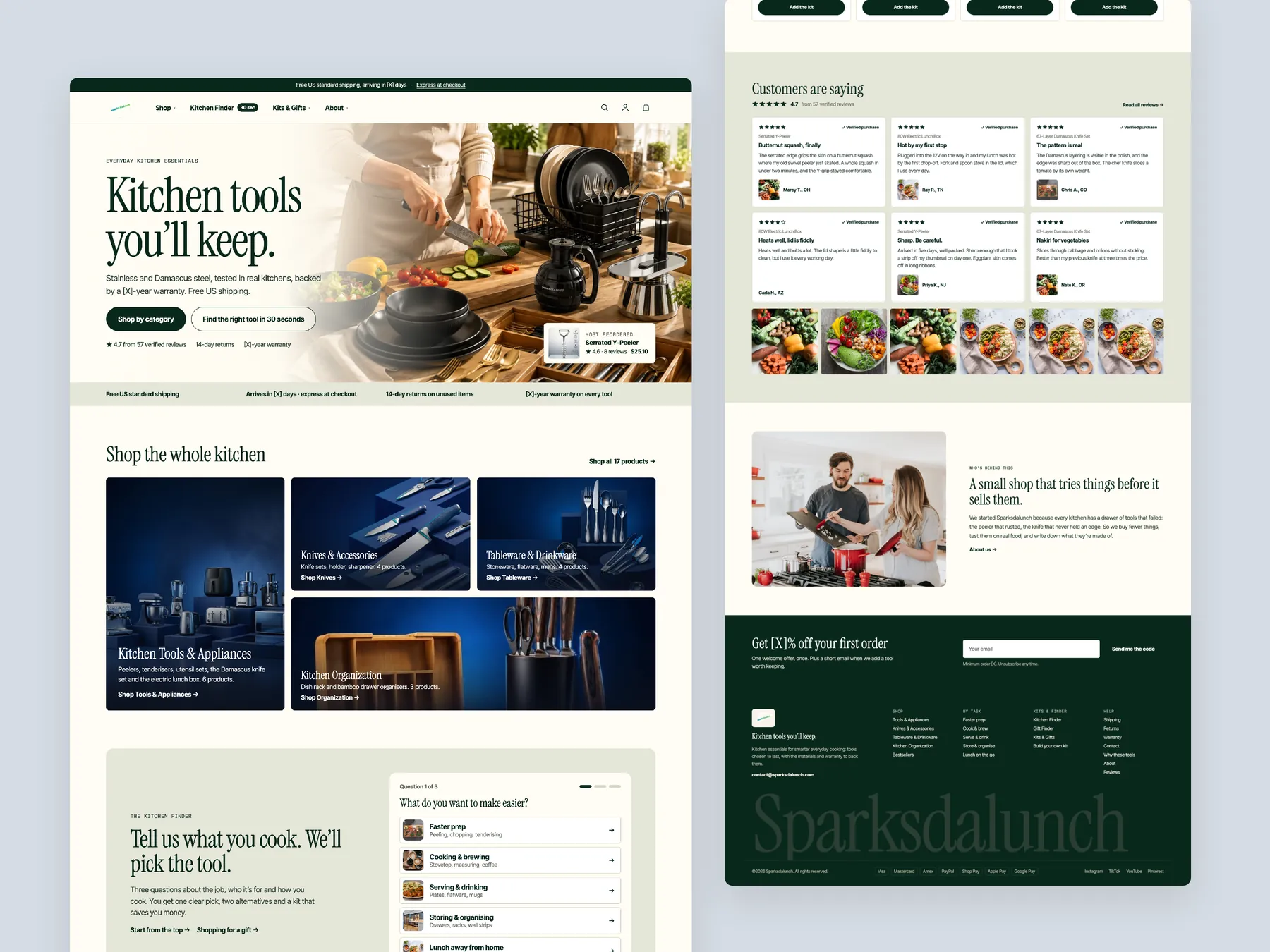
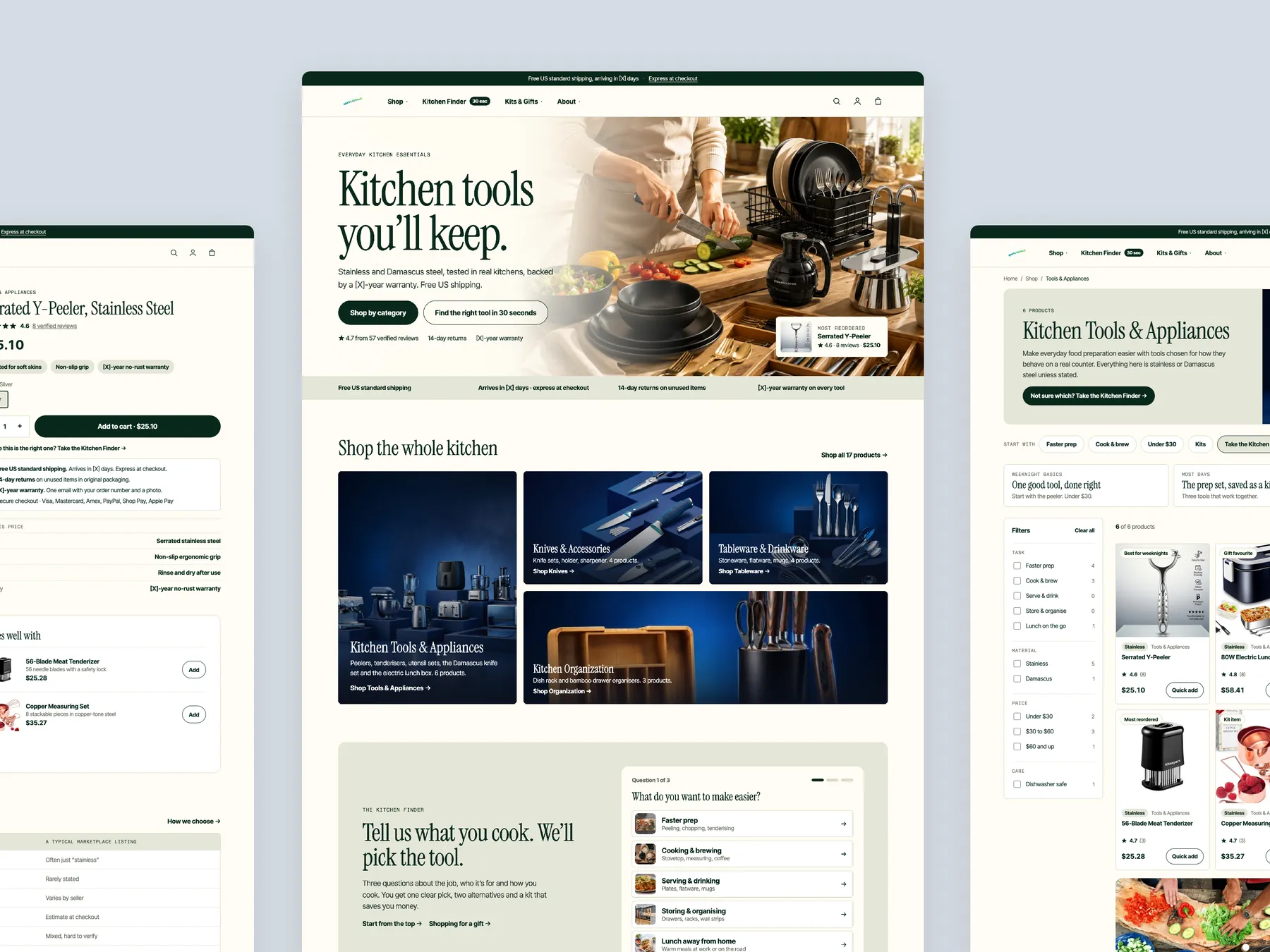
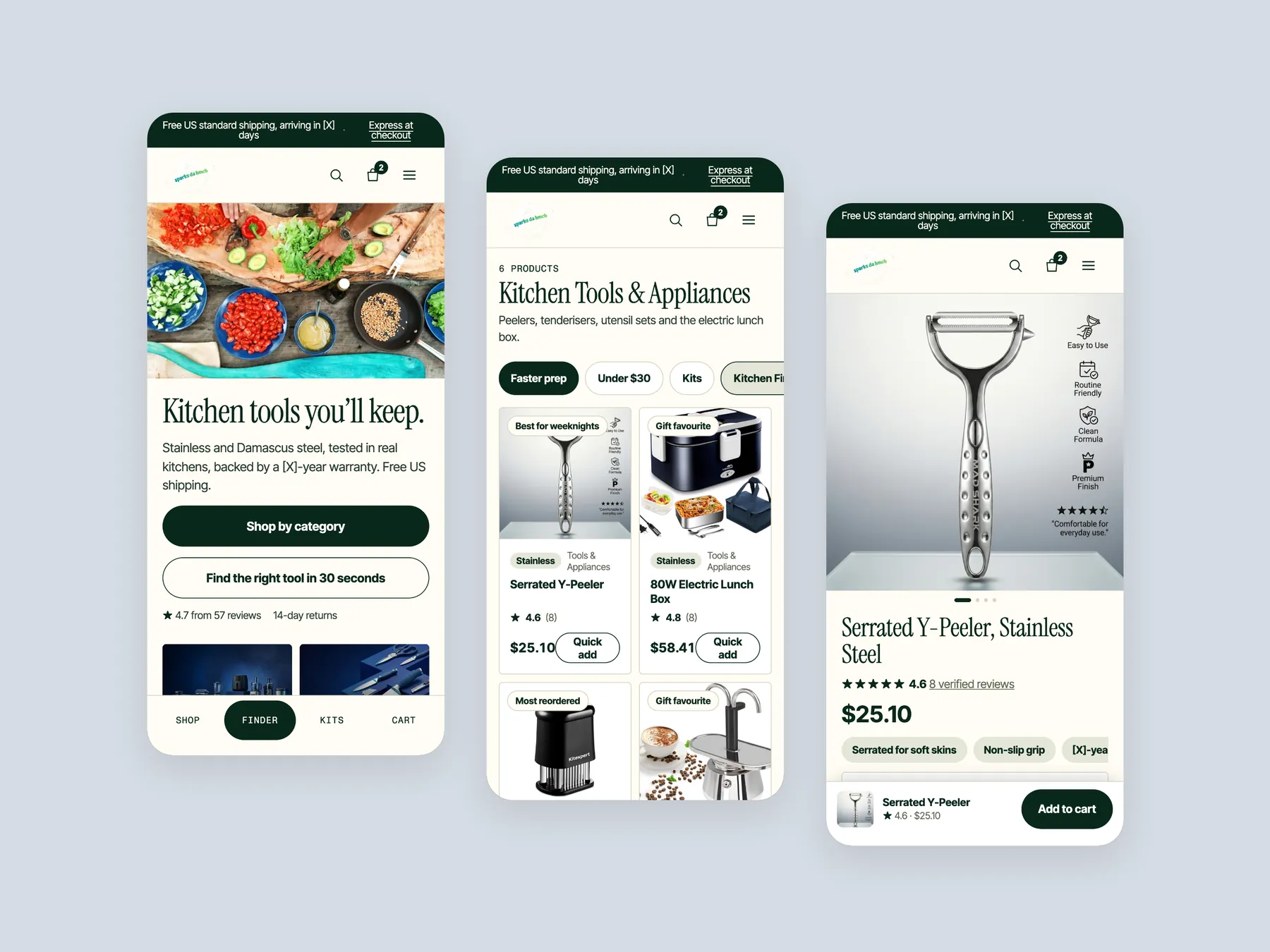
Kitchen tools you'll keep: the hero with its two ways in, the four category tiles, the Finder strip, shop by task, the two hero products, then customer proof, the brand story and the footer.
Storefronts we designed and built, across supplements, fragrance, health, wellness and skincare.
All 35 projectsFour engagements, measured before and after. What changed, why it changed, and by how much.
All case studiesDiagnosis, design and development from one studio — so the recommendation and the build never disagree.
All five services160 real Shopify stores torn down page by page, scored, and shown beside the version we would build. Free to watch.
Browse all teardownsSix conversion-first themes, each built for one industry’s buying journey. Zero required apps, $300, one licence.
Compare all sixA 35 minute CRO teardown of Sparksdalunch, a kitchen tools and appliances store, covering the homepage, collection page and product page, with a conversion focused redesign concept for all three.
Pressing play loads the video from YouTube — you can allow it for every teardown under cookie preferences.
Sparksdalunch sells kitchen tools and appliances and sticks to that one niche, which is rarer than it sounds. The homepage is well structured, the photography is good, and a visitor knows within seconds that this is a kitchen store. Categories are laid out clearly, there is a community signup, reviews exist, and the product page already carries guarantee, safe checkout and returns messaging.
The problem is the presentation layer. The hero tells a visitor what the store sells but not who it is for or why to trust it. Shop All Products and Explore Bestsellers both lead to the same page, so every item reads as a bestseller and none of them stands out. The site shows everything and tells the visitor nothing, which is the opposite of what a good salesperson does.
The same gap repeats on the collection page, which is a grid of 14 products with filters for stock and price only, star ratings without review counts, and no add to cart button, so comparing two items means opening two pages. The product page is the strongest of the three, but its images sit in a long catalog scroll and its trust elements are scattered rather than grouped around the buy button.
Our CRO strategist's redesign turns the site into a guided journey: a hero that answers the basic questions, a menu that lets people shop by task or budget, a finder that recommends a tool in 30 seconds, a real bestseller section, and kits that bundle three products for a saving. The one idea worth remembering is that the website should be the store's salesperson, not its catalog.
The site shows kitchen products without guiding anyone toward one. Every call to action lands on the same page, every product is labelled a bestseller, and nothing tells a visitor who the store is for or why to trust it.
A homepage that answers who the store is for and where to start, a collection page that works like a salesperson, and kits built from the existing range could turn a well stocked catalog into a guided buying journey with a higher order value.
Visitors who already arrive would find a product faster, compare without opening every page, and have more reason to trust the store before checkout, with kits lifting the average order value on each
Five dimensions, each scored out of ten.
14 issues found, 18 fixes proposed.
A visitor can tell within seconds that Sparksdalunch sells kitchen products, but nothing above the fold says who the store is for or gives a reason to trust it, so the first impression stops short of confidence.
Shop All Products, Explore Bestsellers and View All Products all open the same collection, so the homepage offers one route rather than several, and the buttons stop meaning anything different from each other.
Because the bestseller link shows the full range, every product is presented as a bestseller. A visitor has no way to tell which items other people actually choose, which is the whole point of the label.
The cards on the homepage give a name and a price and nothing else, so a visitor cannot compare items where they stand and has to open page after page to work out which one suits them.
The store has reviews, which is more than most sites at this stage, but they are placed at the foot of the homepage where a hesitant visitor is unlikely to reach them before deciding to leave.
The top bar carries five menu items and a handful of categories. There is no way to shop by task, by budget or by recipient, so the menu lists sections rather than guiding anyone toward a decision.
The structure and images are there, but the page never acts like a salesperson asking how it can help. It shows categories and grids without steering a visitor from arrival to a product worth adding to the cart.
The collection page is a grid of 14 products with filters for stock status and price only. There are no cues for material, use or occasion, so the page cannot help a visitor narrow the range down to the right item.
Some cards show star ratings, but not how many people reviewed the item or who they were, so the stars suggest social proof without delivering it, and most of the cards carry nothing at all.
To buy from the collection page a visitor has to open each product, read it, and then add it. Comparing two items means two page loads, which is exactly the effort a collection page should remove.
On the product page the images run down the page one after another instead of sitting in a single gallery, so the visitor scrolls through pictures to reach the details that justify the price.
The product page already has reviews, a guarantee, safe checkout and returns messaging, but these pieces are spread across the page rather than grouped where the buying decision happens, around the add to cart button.
The store sells single items only. There is no pre built kit, no build your own option and no saving for taking three products together, so every sale is one product at a time.
Kitchen tools are a natural gift, yet nothing on the site invites a visitor to shop for someone else, by recipient or by occasion, so one of the easiest second reasons to buy is missing.
Make the first screen say what Sparksdalunch sells, who it is for and why it can be trusted, so the authority and confidence a visitor needs are established before they scroll.
Put two calls to action in the hero: shop by category, and find the right tool in 30 seconds. This is the digital version of the salesperson asking how they can help.
Ask the visitor what they cook and what they want to spend, then show one recommended product with two alternatives beside it and the option to take all three together as a kit.
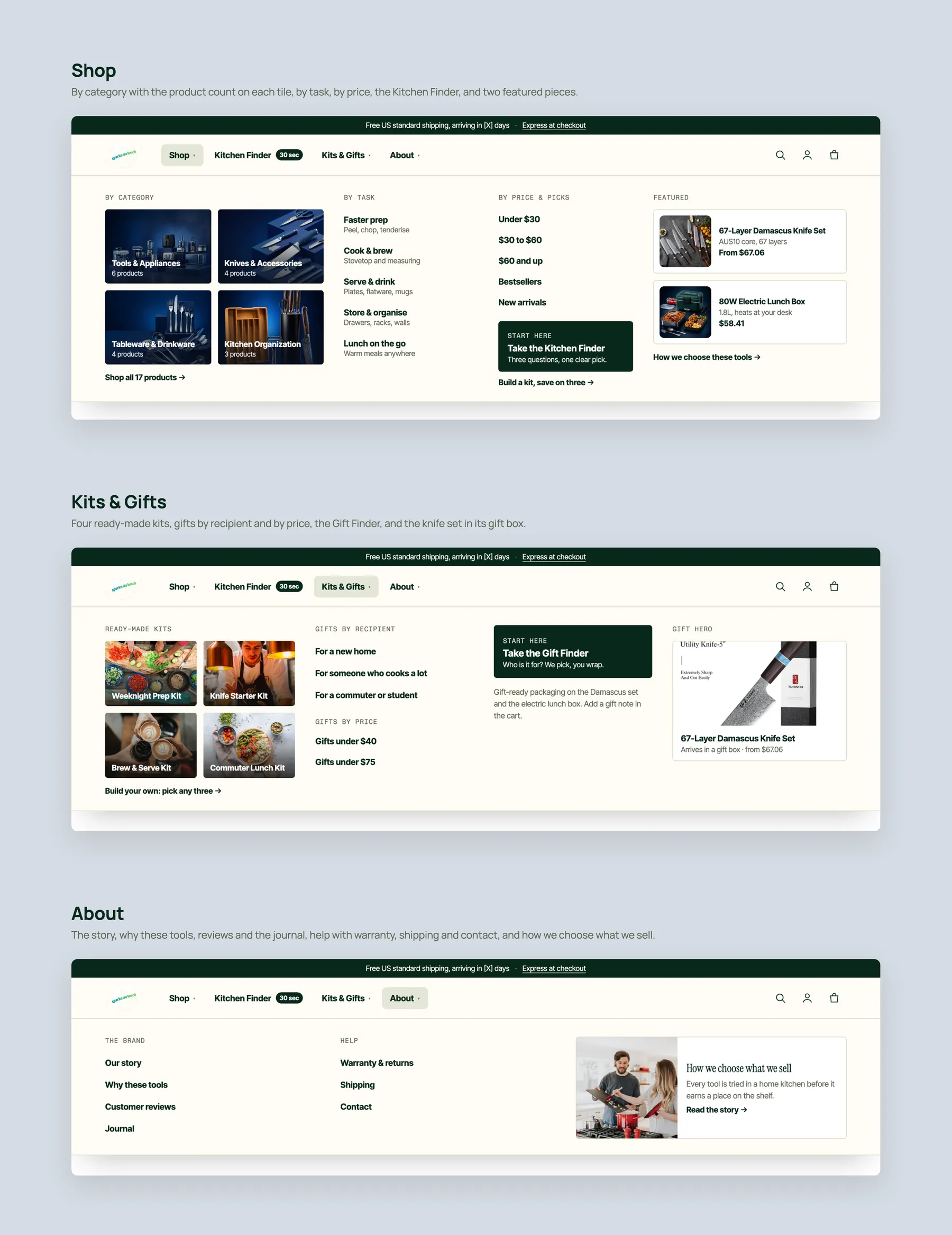
Give the Shop menu routes by category, by task and by price, add a Kits and Gifts menu with starter kits and gifts by recipient, and gather the story, guarantee, shipping, contact and reviews under About.
Choose a small number of products customers actually reorder, label only those as bestsellers, and place the section further down the homepage once the visitor already trusts the store and has a path.
Show the picture, the category, the name, the number of buyers and the star rating, the price and an add to cart button on each card, so visitors compare on the spot instead of opening each page.
Bundle the range into kits such as a knife set, a peeler set or a coffee kit, sell them at a discount you set yourself, and offer a build your own kit option that lets a visitor choose any three products.
Under the hero, let visitors enter a funnel for each category such as kitchen organisation, and a second set by job such as faster prep, cook and serve, so each need has its own starting point.
Add gifts for a new home and gifts for someone who cooks, with a gift finder that asks a few questions, so visitors who are not shopping for themselves still have a reason to buy.
Add a section explaining why a $25 peeler costs $25 at Sparksdalunch rather than $9 elsewhere, covering quality, delivery, shipping and returns, so premium pricing reads as a choice rather than a markup.
Bring customer photos and reviews above the footer and add a founder section, because a real person behind the store builds authority that a logo and a grid of products cannot.
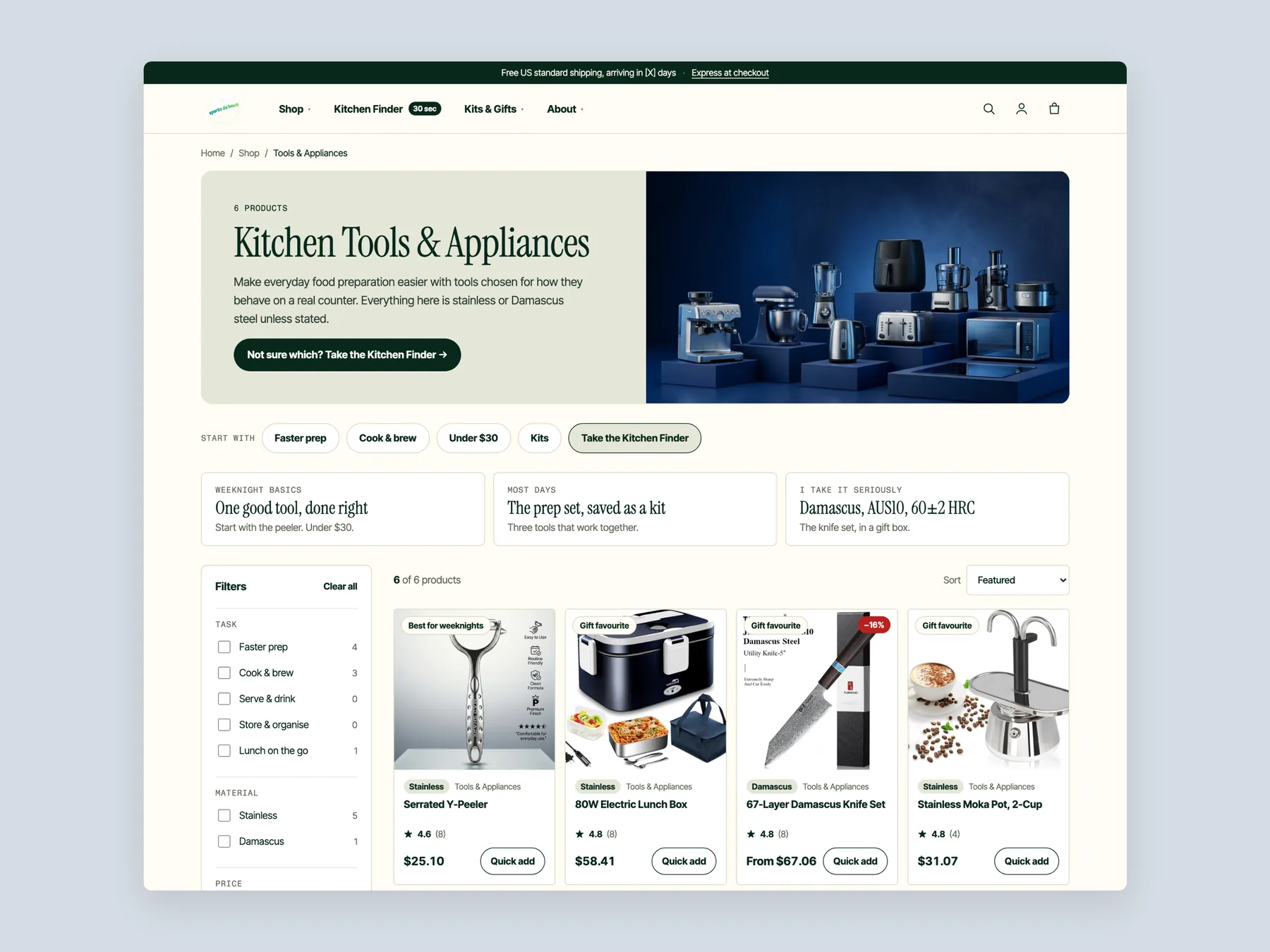
Open with a short line confirming this is kitchen tools and appliances, a call to action for visitors who are not sure, a finder link, and a prompt to start with a $30 peeler and add two tools that work with it.
Replace the stock and price filters with sorting by material such as stainless, by use such as best for weeknights, by gift suitability, by most reordered and by kit item, with a how we choose section and FAQ beneath.
Let visitors add a product straight from the grid, with the rating, review count and price visible, so the collection page completes a sale instead of only pointing toward one.
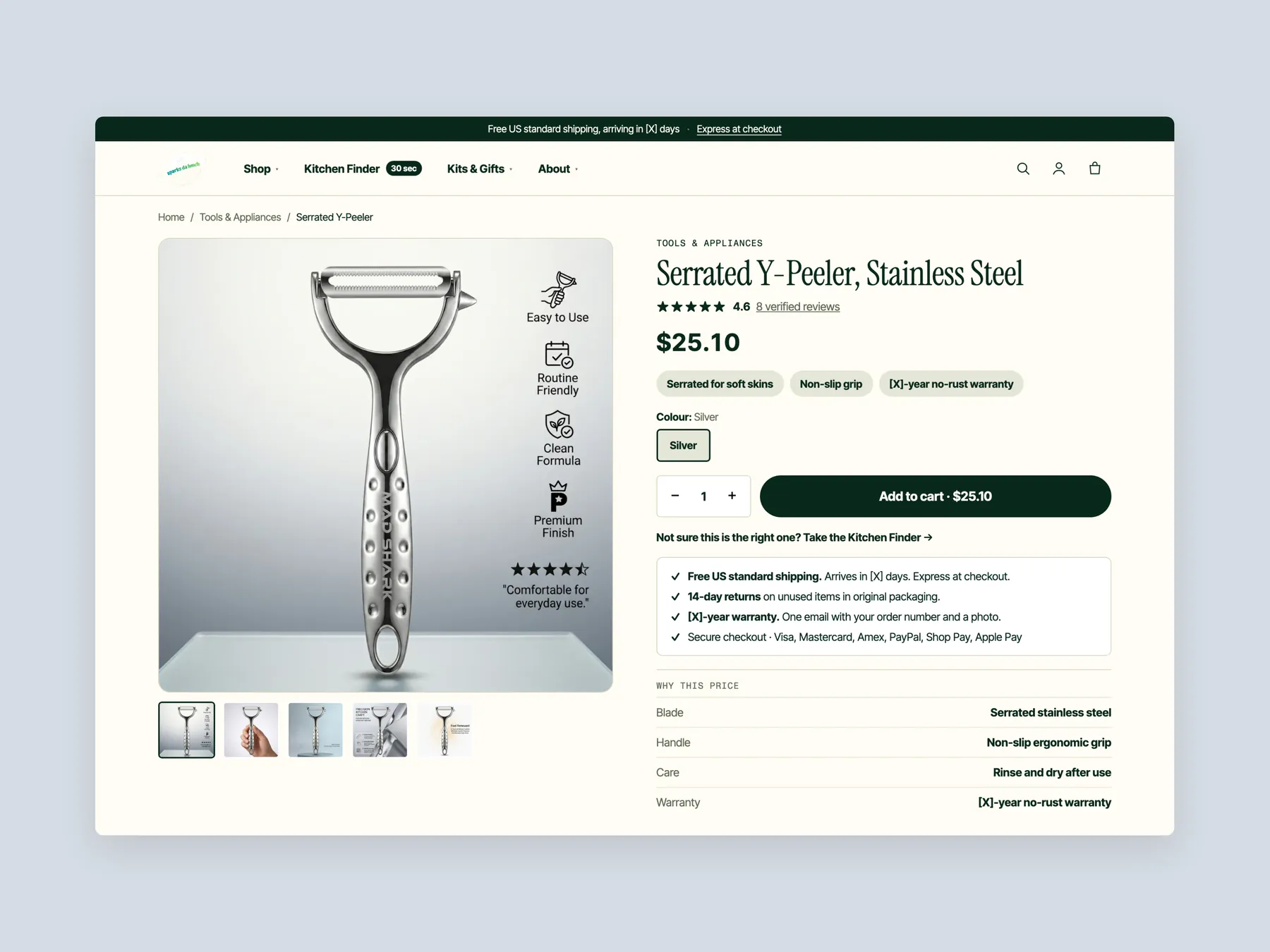
On the product page, place the arrival date, delivery terms, returns and warranty directly beneath the add to cart button, so the questions that cause hesitation are answered where the decision is made.
Replace the long scroll of pictures with a single gallery on one side and all the product information on the other, including the verified review count, category and price above the fold.
Below the buy section show the set this product belongs to, items that go well with it, how it works, specifications such as blade, handle, care and warranty, customer photos, reviews and FAQ, ending with a plain you may also like row.
Hold off on Meta ads until visitors who already arrive are converting, because sending more people to the current pages spends budget on the same hesitations and makes it hard to tell what is working.
A concept redesign of Sparksdalunch, an independent kitchen tools and appliances store. Homepage, mega menu, Kitchen Finder, collection, product page, search and cart, built from the findings of a conversion audit of the live store. The live store shows everything and tells the shopper nothing. Every button leads to the same grid, the product page has a title and a price but no description, and four discounts compete on one visit. A shopper who knows the same peeler is on a marketplace has no reason to buy it here. The store acts like a salesperson. The hero says what it sells and gives two ways in: shop by category, or find the right tool in a few questions. The Kitchen Finder turns a job and a budget into one pick with two alternatives and a kit. Every product card carries the price, a material chip and a quick add. The product page answers delivery, returns, warranty and why this price right under the button, then offers the kit that completes the set. Search never ends in a dead end.
A concept redesign created by Convertica Studio from this audit. It shows how the store could work, it is not the live store.
Kitchen tools you'll keep: the hero with its two ways in, the four category tiles, the Finder strip, shop by task, the two hero products, then customer proof, the brand story and the footer.
The homepage in the centre, the product buy column on the left, the Kitchen Tools & Appliances collection on the right.
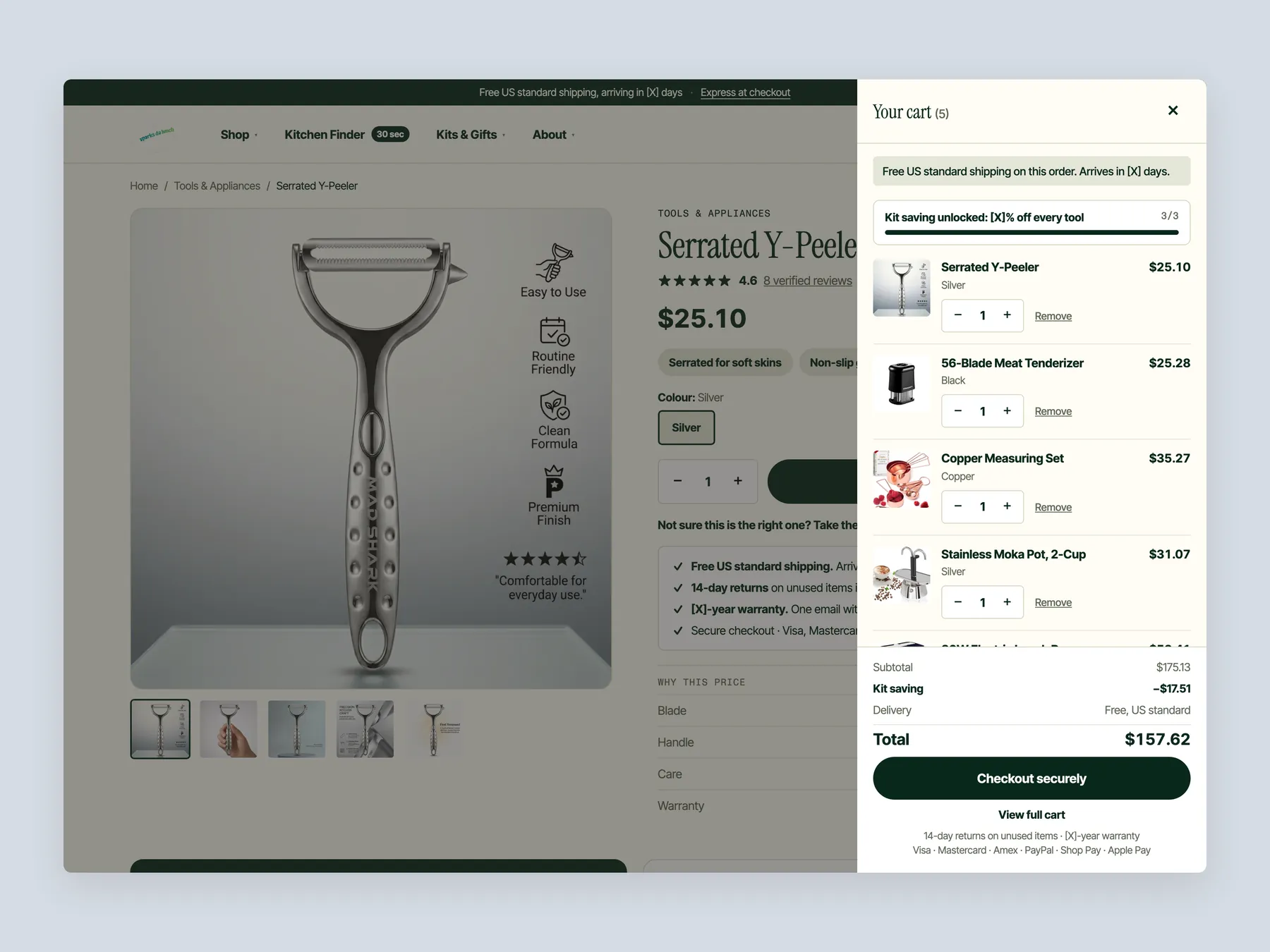
A slide-over with the free shipping line, the kit saving bar, five lines, delivery under the total and Checkout securely.
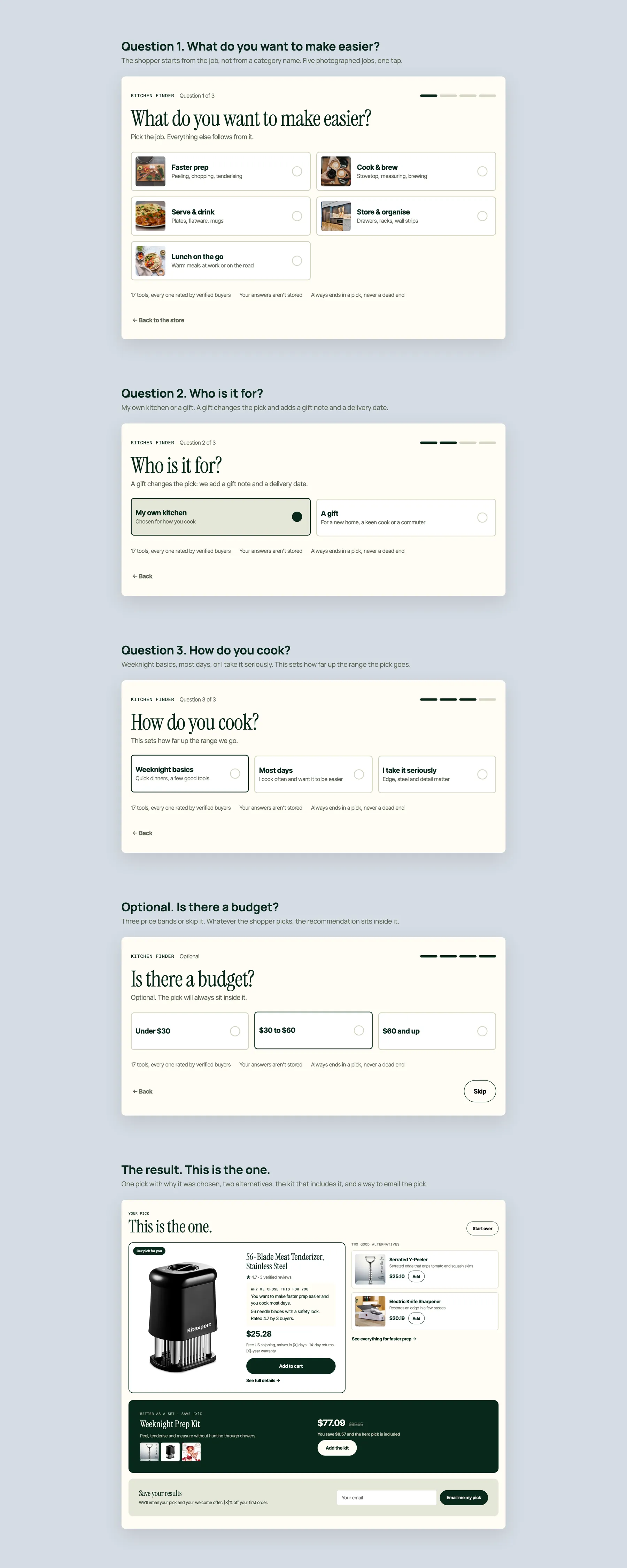
What do you want to make easier, who is it for, how do you cook, is there a budget, then one pick with why it was chosen, two alternatives and the kit that includes it.
Buy box, complete the set, the comparison, description, specs, in real kitchens, reviews, policies and you may also need.
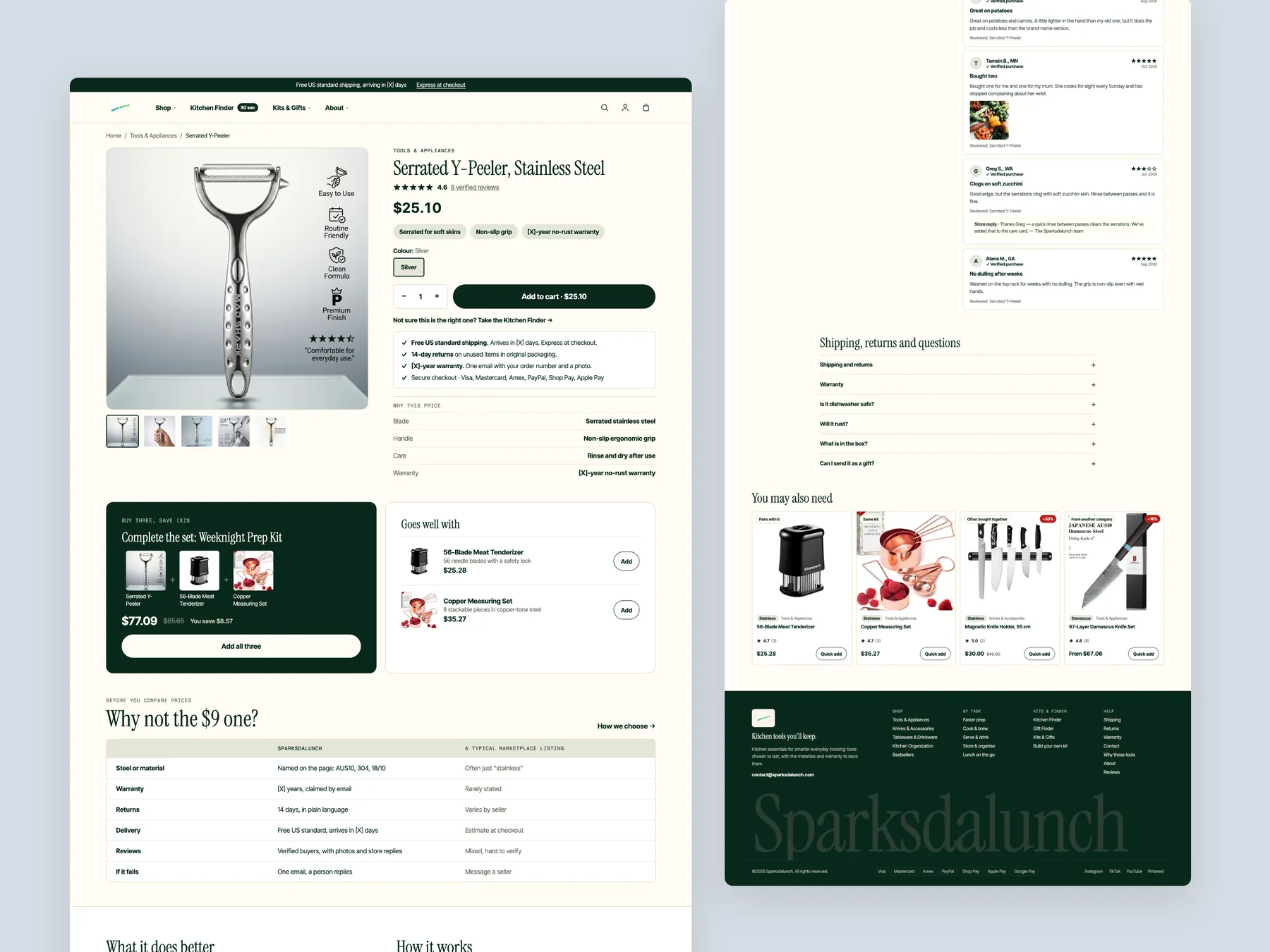
Title, rating row, price, three benefit chips, colour, quantity and Add to cart, the Finder link, the delivery, returns and warranty lines, and why this price.
Kitchen Tools & Appliances with the banner, the start-with strip, three tiles by how you cook, the task and material filters and the first row of cards with quick add.
Shop, Kits & Gifts and About, each with its link columns, pictured tiles and a place to start.
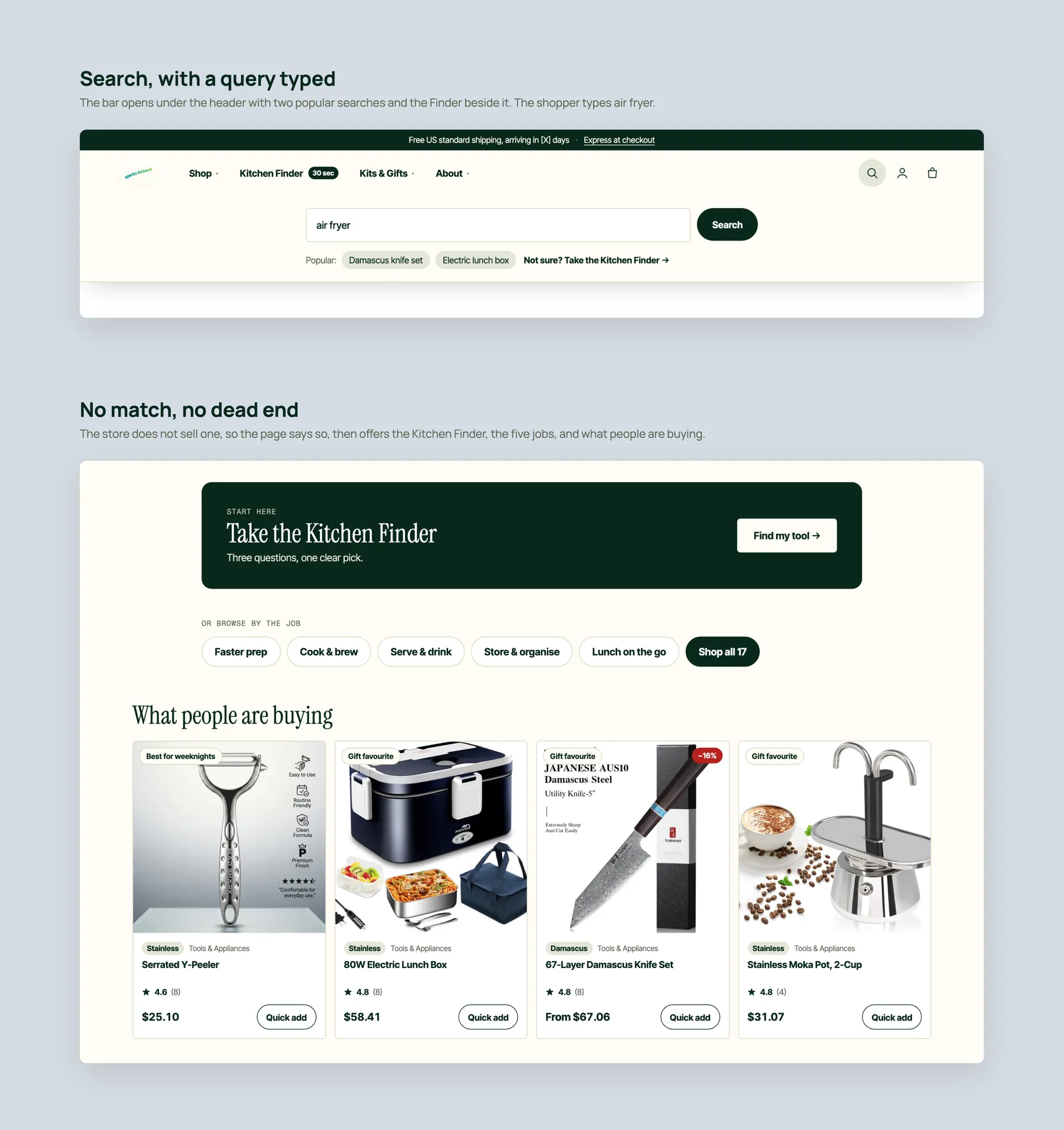
The bar with a query typed, then the no-match page that offers the Finder, the five jobs and what people are buying instead of a dead end.
The first screen with its tab bar, the collection with two-up cards, and the product with its pinned Add to cart.
Sparksdalunch is an online store for kitchen tools and appliances. It stays within that single niche, and the audit notes that the product range itself is good. The issues are in how the products are presented, not in what is being sold.
The homepage shows categories and product grids, but Shop All Products, Explore Bestsellers and View All Products all open the same page. Nothing asks the visitor what they need or steers them toward a specific product. The structure is there, but the guidance is not.
The bestseller link opens the full range, so every item is presented as a bestseller. That removes the signal the label is meant to give. The redesign picks a small number of products customers actually reorder and shows only those as bestsellers, later in the page once trust has been built.
It works like a catalog. There are 14 products, filters for stock and price only, star ratings without review counts, and no add to cart button on the cards. Comparing two products means opening two pages, which is the work a collection page exists to remove.
The product page already carries reviews, a clear name and price, a description, a guarantee, safe checkout and returns messaging. Our CRO strategist noted that most stores at this stage do not have these elements at all. The fixes are about grouping them around the add to cart button and collecting the images into one gallery.
It is a short series of questions about what the visitor cooks and what they want to spend. Based on the answers it recommends one product, shows two alternatives beside it, and offers all three together as a kit. A gift version asks who the visitor is buying for.
Instead of selling one peeler, one knife or one brewer to three different people, a kit sells all three to one visitor with a saving the owner sets. That raises the average order value from the traffic the store already has. A build your own kit option lets visitors choose any three products themselves.
No. The audit is explicit that it does not suggest changing colours, fonts or other cosmetic details. The photography and overall structure are described as good. Every recommendation is about removing hesitation and giving the visitor a path, from the hero to the product page.
The recording recommends making sure visitors who already land on the site are buying before paying to bring more. Sending traffic to pages with the same hesitations spends budget without learning anything. Once on site conversion improves, Meta ads can be resumed with more confidence.
It adds a section explaining why a $25 peeler costs $25 at Sparksdalunch rather than a lower price on Amazon or Temu, covering quality, delivery, shipping and returns. On the product page the same reassurance sits next to the price, so the visitor sees the reason before they see the number.
The redesign opens with a line confirming the store's niche, a finder link for visitors who are not sure, and a prompt to start with one tool and add two that work with it. Filters cover material, use, gift suitability, most reordered and kit items. Every card shows rating, review count, price and an add to cart button, with a how we choose section and FAQ beneath.
The recording runs 35 minutes. It reviews the homepage, the collection page and the product page of Sparksdalunch as a visitor would experience them, then walks through a redesign concept for each of the three pages and closes with next steps.
Tell us about your store and we'll send a personalized 5-minute video showing exactly where you're losing buyers — and how to win them back.
Takes about 40 seconds. No call required.